Meet Clara and the Web Map
Clara runs a site about vintage wall clocks. Her website is like a house with rooms. An internal link connects pages on one site. We call this path an internal link. It works like a door between two rooms. You can walk through it to learn more.
A reader finishes a guide about clock gears. A link to oiling those gears makes sense. A link to buying shoes does not fit. Choose the next step with steady care. Clara wants to use smart tools for linking. She wants to help readers find great answers.
Smart apps can spot good paths very fast. They read your guides to find shared topics. But Clara must guide the tool with care. Adding too many links makes a page messy. A messy page makes reading much too hard. It turns a clean guide into pure clutter.
Clara wants tidy paths through her clock guides. She wants readers to feel calm and informed. She learns simple rules before touching any buttons. Good links help real people finish real tasks. They guide people safely from room to room. Good doors make the whole house feel friendly.
- Find related pages that already help readers.
- Use link text that names the task.
- Check that each link reaches working pages.
Tools and Inputs You Need
First, gather your site notes in one spot. You need a list of your live guides. In web work, this is a page inventory. A page inventory is a master page list. We call this list an inventory. It lists titles and clean addresses in rows. It shows every guide that you have published.
You also need a canonical URL for each. A canonical URL is an official web address. We call this link a canonical link. It is the main public address of a page. It stops readers from seeing confusing twin copies. Every single guide must have one true address. That address prevents broken paths on your site.
Next, write down the user intent for each. User intent means the goal of the reader. We call this goal the user intent. It is the exact problem they must solve. A reader might want to clean clock hands. That clear goal is their user intent. Always write that goal down with honest care.
Give this clean data directly to your tool. Never let the tool guess your map alone. Clean notes create safer link ideas every time. Clear records keep your project free from errors. You now have the right tools ready today. You can build safe paths with these notes.
A Worked Example with Practice Data
Clara tests her steps on a practice site. The site hosts guides about writing computer code. A guide about importing code explains source files. A repository is a digital code folder. We call this storage box a repository. Readers next need to fix their run settings.
In simple words, they must fix setup settings. That allows their software project to run cleanly. An internal link should connect those two steps. You must link inside the most helpful paragraph. Clara checks where this new connection belongs. She wants the connection to feel totally natural.
A vague phrase misses the helpful goal completely. Words like “click here” give no good hints. Repeating the same phrase harms the teaching text. It annoys readers when placed in every sentence. Clara writes down clear practice data in rows. She matches every step with a clear label.
She reviews her notes before making live edits. She pairs each source page with sensible targets. Each row shows the exact task for readers. This practice helps her spot weak choices fast. Good links always respect the reader's own time. Careful checks make each step worth clicking.
| Source Page (Current Reading) | Destination Page (Next Step) | Natural Anchor Text |
|---|---|---|
| Importing Source Repositories | Diagnosing Runtime Configuration | diagnose runtime configuration |
| Cleaning Clock Gears | Testing Clock Spring Tension | test clock spring tension |
| Baking Artisan Bread | Feeding Sourdough Starter | feed your active starter |
Picking Clear Anchor Text
Clickable words in a sentence are anchor text. We call these words anchor text. You click on this text for more details. Good anchor text tells readers what comes next. It sets clear expectations before anyone clicks today. Clara wants her anchor text to stay plain. Plain words help people make good choices quickly.
Never hide the topic behind strange, vague words. Avoid flat words like “page” or “read more”. Make words specific to the new target page. If the page is about oil, name oil. Specific words help readers pick their own path. Clear labels remove fear from clicking new links.
Keep the anchor text natural in the sentence. It should sound like normal human speech aloud. Read the full sentence out loud to test. If it sounds stiff, rewrite the words now. Natural words make reading smooth, clear, and pleasant. Readers stay focused when sentences flow very well.
Do not force matching keywords into every sentence. Search tools prefer ordinary links that make sense. Crawlers index pages best when links flow well. Clear doors help both search tools and visitors. Natural writing wins trust from everyone who visits.
Make sure public pages use standard clickable links. Do not hide links inside fancy script buttons. Search crawlers must follow links without special tricks. A simple address link works best for everyone. Plain code keeps every page easy to find.
A Practical Sequence for the Work
Follow a careful sequence when using your tool. First, give the app your approved page list. The app looks through all your clean addresses. It matches related topics across your entire collection. It looks for common ideas between different guides. It spots topics that naturally belong together online.
Next, ask the tool to spot useful needs. A prerequisite is a skill needed first. We call this early step a prerequisite. For example, cleaning gears comes before oiling them. Readers must finish the first step before next. Finding prerequisites prevents readers from getting very confused. It keeps beginners from feeling lost or stuck.
Then, let the app suggest sensible next questions. What will the reader ask after this guide? Propose a clear link that answers that question. Keep the number of links small per page. A few great links beat dozens of extras. Too many links can overwhelm any busy person.
Finally, review every single suggestion with your eyes. Check that the destination page is live now. Make sure the sentence sounds clean and natural. If a suggestion feels awkward, remove it fast. Human judgment keeps your whole website friendly today. Your own eyes make the final good call.
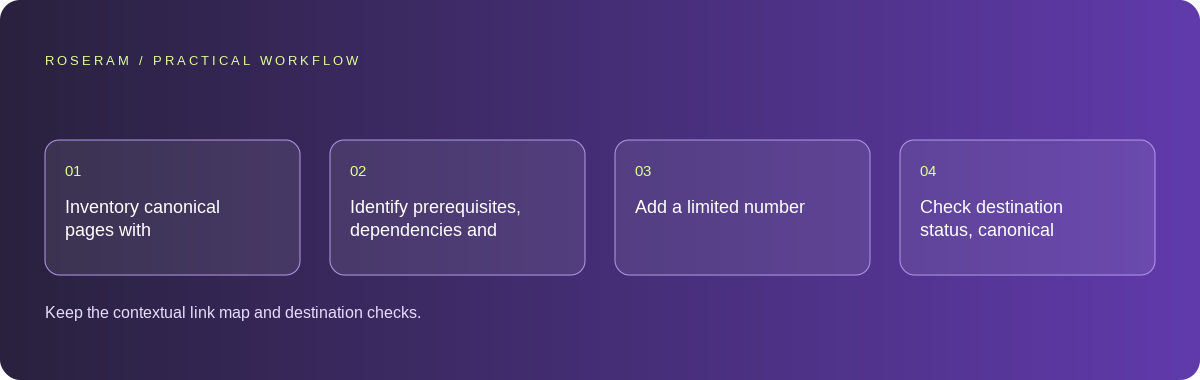
- Inventory canonical pages with their actual reader tasks.
- Identify prerequisites, dependencies and sensible next questions.
- Add a limited number of contextual links with descriptive anchors.
- Check destination status, canonical alignment and usefulness in the surrounding sentence.
A Second Real Use Case
Now let us examine a second real case. Marco runs a site about growing garden vegetables. A reader visits his guide about planting tomatoes. The guide teaches how to place seeds well. The reader feels excited to grow fresh crops. Marco wants to give them a great path.
Marco asks his app to find related articles. The app spots two helpful guides on site. One guide covers building stakes for tall vines. That guide is a great step for later. The reader will need stakes when vines grow. It is a helpful topic for next month.
The second guide covers watering tiny green sprouts. This watering guide is an urgent early step. Seeds will not sprout without right daily water. Marco links to watering inside the soil paragraph. The reader gets help at the right moment. The advice arrives right when they need it.
Marco checks the anchor text in that sentence. He uses the words water young tomato sprouts. The phrase describes the destination with complete clarity. The reader clicks the link and learns care. Helpful connections turn casual visitors into loyal readers. Good links answer needs before frustration sets in.
Mistakes and How to Fix Them
Apps can make silly errors if you rush. An app might suggest links to missing pages. It might pick an article deleted last week. Always verify that each web address works now. Never publish links to missing pages on site. Broken links leave readers feeling annoyed and stuck.
Another common mistake is linking to private areas. An app might suggest an internal account screen. Private workspace pages should not appear in links. Public visitors cannot open private user screens anyway. Always keep your links focused on public articles. Save private screens for logged in members only.
Do not guess destinations from web slugs alone. A slug is the end of an address. We call this tail piece a slug. Slugs can mislead you about the real topic. Always inspect what the article says right inside. Make sure it truly answers the reader's question. A quick check prevents a wrong link choice.
Avoid turning your guide into crowded link walls. Too many links distract people from main lessons. Add links only when they serve clear goals. A tidy guide helps readers finish work faster. Keep your writing clean, calm, and very helpful. Readers will thank you for keeping pages neat.
The Friendly Reader Test
You can run an easy test right now. Open your linked article on your computer screen. Read each paragraph out loud at steady pace. Pause whenever you reach a highlighted link word. Look closely at the words inside that link. Make sure the words make total sense together.
Ask yourself if words name the next task. If the text says “read here”, fix it. Rewrite the sentence so it names the destination. Good anchor text explains where the reader goes. It builds trust before any button gets clicked. Readers feel safe when they know the destination.
Next, click the link to see what happens. Does the destination page open without error screens? Does the article answer the question promised earlier? If yes, your link passed this practical test. Keep notes of these tests in your files. Good records make your site easy to maintain.
Check how the whole page looks and feels. Make sure the text looks tidy on phones. Links should sit comfortably within the text body. They should never crowd out your main tips. Each link must serve a real human reader. When in doubt, leave extra links right out.
| Controlled case | Expected evidence |
|---|---|
| Suggested destination is absent | The link is not published as if the article exists. |
| Reader follows a prerequisite anchor | The destination actually resolves the prerequisite. |
| Crawler follows hub navigation | Public articles are reachable with real href links. |
Your Next Step Today
Start small with your linking project this afternoon. Pick three related articles on your current website. Write down the canonical address for each one. Write one short sentence about the reader's goal. You now have a working three-page inventory ready. This small start makes big tasks feel easy.
Roseram can help you sort lists and draft. Access and limits depend on your current plan. Your personal review remains essential for every link. Helpful human checks make every doorway useful now. You bring the real judgment that tools lack. Your careful eye keeps the whole site welcoming.
Save your updated link map in your files. Check your links every few months for health. Tidy pathways keep readers happy and returning often. You are ready to build clear links today. Take your first small step on your site. You will see great results very soon indeed.
Review this canonical page inventory for useful internal links. Match prerequisites and next tasks, then propose the exact source paragraph, destination and natural anchor. Do not invent URLs or force exact-match wording. Exclude private account resources. Validate that each destination answers the promised question before editing links.
Your idea. Your next step.
Put Roseram super intelligence to work.
Bring the idea you keep coming back to. Choose a Roseram plan, then give your project a clear first task. You can think it through, build a first version, and improve it as you learn.
Check current access, plan limits, and pricing before joining.
Your next step
Your quick checklist.
Tick a step as you finish it. Your ticks and feedback stay on this device. They are not public reviews.
0 of 7 complete
Tell the community what you tried or tell us what needs fixing. Include a source if you are correcting a fact.
Your questions, answered
Must every anchor use the exact keyword?
No. Write natural sentences instead. Anchor text is clickable words. Describe the linked target clearly.
Can a search bar replace browse links?
No. Keep ordinary links on pages. Visitors need simple link paths. Search bars can miss things.
How do I know the task is done?
Keep a clear link map. Test every link target out. Good links help readers move. Do not force repeat words.
Why should I avoid linking to private account screens?
Public readers lack account access. Private links will look broken. That confuses your visitors quickly.
Want the technical details?Open the code notes, deeper checks, and common questions.
These notes go deeper. Use the parts that fit your project. Examples are for learning; they are not claims that we tested your app.
A worked example: where the task becomes difficult
A fictional guide about importing repositories explains how to obtain source, but readers next need to diagnose runtime configuration. An internal link should connect that dependency at the relevant paragraph. A generic “click here” misses the relationship, while repeating the same exact phrase in every sentence distracts from the instructions. Build a page inventory with canonical URLs and short intent descriptions.
Decisions to make before implementation
Distinguish navigation links, contextual references and related reading. Keep anchor text natural and destination-specific. Link to a canonical useful page instead of an obsolete redirect where possible. Do not infer destinations from slugs alone; inspect what the page actually answers. Make important public pages reachable through ordinary links, not exclusively through a search field or JavaScript interaction.
A practical sequence for the work
Use the sequence below as a task boundary, not as a claim that the example has been executed. Work with approved inputs and the project’s actual architecture. If a required integration or permission is unavailable, keep that stage visibly incomplete rather than generating a plausible substitute result.
- Inventory canonical pages with their actual reader tasks.
- Identify prerequisites, dependencies and sensible next questions.
- Add a limited number of contextual links with descriptive anchors.
- Check destination status, canonical alignment and usefulness in the surrounding sentence.
A detailed brief you can adapt for your agent
Replace the illustrative context with your approved facts and controlled inputs. Keep the stated boundaries when adapting the brief. The expected deliverable matters more than a particular tool name: ask for an explanation grounded in the inspected material and evidence for the requested outcome.
Review this canonical page inventory for useful internal links. Match prerequisites and next tasks, then propose the exact source paragraph, destination and natural anchor. Do not invent URLs or force exact-match wording. Exclude private account resources. Validate that each destination answers the promised question before editing links.
Failure modes that an attractive preview can hide
Generated suggestions can point to nonexistent articles or choose a similarly titled page with a different intent. Validate the destination before inserting links. Avoid turning an article into a wall of promotional anchors. Private account pages and workspace project contents should not be added to a public discovery map simply because the application can navigate to them.
Acceptance checks and the evidence to retain
Keep the contextual link map and destination checks. An internal link should help a reader progress, with keyword relevance emerging from the relationship rather than forced repetition.
| Controlled case | Expected evidence |
|---|---|
| Suggested destination is absent | The link is not published as if the article exists. |
| Reader follows a prerequisite anchor | The destination actually resolves the prerequisite. |
| Crawler follows hub navigation | Public articles are reachable with real href links. |
Common questions
Must every anchor use the exact keyword?
No. Describe the linked resource clearly in the surrounding context.
Can a search bar replace browse links?
Keep important pages reachable through ordinary navigation links as well.
What is the practical completion criterion?
Keep the contextual link map and destination checks. An internal link should help a reader progress, with keyword relevance emerging from the relationship rather than forced repetition.
Where the facts come from
Use these links to check the technical facts. The stories here are made-up examples to help you learn. Roseram sells AI tools; our examples are not promises of results.
- Google: crawlable links and descriptive anchors ↗
What this source covers
Public link discovery and understandable anchor text; links do not guarantee rankings.
References last reviewed 2026-10-11. Writing refreshed 2026-10-14. Spot a mistake? Tell us.
