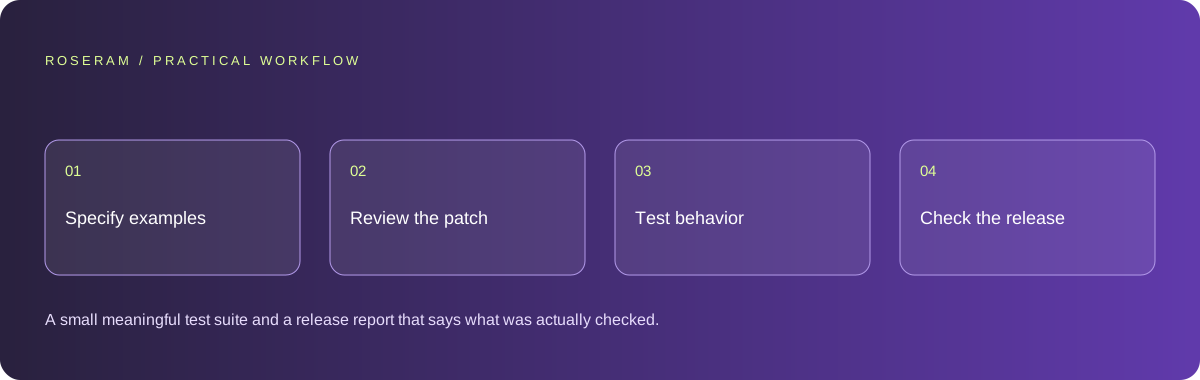
Write examples before asking for tests
Begin with the feature’s contract. For a discount function, define whether the discount applies before or after tax, how rounding works and which inputs are invalid. For a form, define the accepted fields, validation failures and successful outcome. A test that follows the implementation’s accidental behavior can pass while preserving a bug.
Choose a few inputs with expected outputs you can explain without reading the generated function. Include a ordinary case, a boundary and a rejection case. When rules are ambiguous, clarify them before turning the ambiguity into a test assertion. Keep the examples with the project brief so later revisions have the same reference.
Ask the agent to distinguish a requirement from an inference. If a test expects a particular error message but the requirement only specifies a rejected operation, the test may be unnecessarily brittle. Prioritize outcomes users depend on and reserve detailed implementation assertions for contracts that truly require them.
| Feature | Independent example | Failure to detect |
|---|---|---|
| Enquiry form | Valid submission is recorded once | Success message without delivery |
| Private record | Another account is denied access | UI hides a record but API exposes it |
| Credit purchase | A repeated event does not duplicate credit | Retry causes a second entitlement |
| Navigation | Back returns to the expected screen | Correct visual state with broken history |
Review the diff before trusting a green test run
Read which files changed and why. Check that the patch stays within the intended feature, preserves public interfaces and avoids deleting tests that exposed a failure. Ask for an explanation of configuration and dependency changes. A green command has limited meaning if the agent silently reduced the test scope.
Look for placeholder behavior disguised as a connection: fixed success responses, sample data in a production route or a button that changes local text instead of calling the required backend. These can be reasonable prototypes when labeled clearly, but they should not pass a launch acceptance test for a working integration.
Keep the baseline and changed revision identifiable. If a failure appears, compare the patch with a known state instead of rewriting everything. Reproducibility matters more than an impressive quantity of test output. Record the exact command and environment when the result is relevant to release.
Use the smallest test that proves the intended behavior
Pure calculations are good candidates for unit tests. Interactions among authentication, validation and storage need integration checks. Critical customer journeys need browser or device checks. The layers complement each other: an isolated calculation can be correct while a screen passes the wrong input into it.
Playwright’s guidance emphasizes user-visible behavior and isolated state. In a browser test, locate the control by its accessible role and verify the outcome that matters. Avoid tying a journey to incidental CSS selectors when the same behavior can be expressed through a button name, field label or visible result.
Use controlled test services and fixtures. A test should not send real marketing messages, charge a real customer or mutate production records merely to prove that a button responds. Test integrations in the correct environment and keep their verification distinct from a mocked request. Mocks prove your response handling, not the availability of an external provider.
test('invalid enquiry stays recoverable', async ({ page }) => {
  await page.goto('/contact');
  await page.getByRole('button', { name: 'Send enquiry' }).click();
  await expect(page.getByText('Enter a valid email')).toBeVisible();
  await expect(page.getByRole('button', { name: 'Send enquiry' })).toBeEnabled();
});
Technical references: Playwright: testing best practices
Test interruption, repetition and conflicting state
Try a slower response, a rejected request and a retry. Click a submit action twice and check whether the system records one intended result or two. Navigate away and return during pending work. Decide whether cancellation stops the underlying operation or only hides the screen; the UI should not misrepresent the server state.
Use two accounts for private data checks and two revisions for conflict checks. A workspace edit may conflict with a change made elsewhere, and a locally cached result may belong to a previous user. Check logout, account switching and project switching. These transitions often reveal state assumptions that a happy-path test does not exercise.
For long-running work, inspect stage changes and timeout behavior. A progress indicator should represent actual observed work, not a fabricated percentage that reaches completion before the operation finishes. A failure should retain enough context for a controlled retry instead of dropping the user back into an empty state.
Inspect the real browser, mobile layout and console
Test narrow screens and keyboard access. Open and close menus and dialogs, submit the main form and verify that the page remains usable after an error. Detect invisible overlays and scroll locks by interacting with the rendered page, not only measuring element rectangles.
Use the console and network view to connect an observed failure to its request or stack trace. Preserve relevant messages across navigation when reproducing a sequence, and redact credentials before sharing output. A blocked advertising request and an application state error can appear together without having the same cause.
After a repair, repeat the original failing action and one nearby regression case. Stop broadening the test set once the concrete risk and required gates are covered. A large redundant suite can slow delivery while adding less confidence than a small independently grounded set of checks.
Technical references: Chrome: console features reference
Separate local checks, provider checks and deployed behavior
A useful report names the tested revision, command, environment and limitation. “Unit tests passed locally; checkout was mocked; production webhook delivery is unverified” gives a release owner actionable information. “Everything works” hides the distinctions they need.
Keep deployment checks small and purposeful. Verify the deployed route, configuration and critical journey because production can differ from local development. For a native app, use the actual packaged build. For an imported project, verify source-to-preview synchronization. Do not imply that a desktop browser test covers either condition.
Specific answers
Common questions
Should AI write the tests too?
It can help implement them. Define expected outcomes independently, review assertions and inspect whether the tests would fail for a plausible defect.
What is more important than code coverage?
Coverage is a useful signal, but correct requirements, meaningful assertions and critical journey checks determine what the suite actually proves.
Should tests call real third-party services?
Use controlled test environments where appropriate. Avoid unintended charges or communications, and distinguish provider verification from mocked integration behavior.
Sources and editorial method
These references support the indicated technical facts. Workflows, examples and decision tables are original Roseram analysis. Illustrative costs are not vendor prices. No search volume, organic difficulty, ranking result or product endorsement is implied.
- Playwright: testing best practices ↗
Tests based on user-visible behavior and isolated test state.
- Chrome: console features reference ↗
Inspecting messages, stack traces and network errors.
Roseram offers AI software and may compete with tools discussed here. Sources checked 2026-10-11. Send a sourced correction.
Your next step
Keep a practical checklist.
Mark your progress. This checklist and helpfulness choice are saved on this device only; they are not public reviews.
0 of 5 complete
Share your experience in the community or submit a sourced correction. Public experiences remain separate from editorial claims.
Bring your next idea
Keep learning. Build with context.
Get Roseram model and workspace reopening updates. The guide remains available whether or not you subscribe.
Explore the workspace guide →