Meet Maya and Her New Recipe App
Maya built a fun recipe app for home cooks. She used fast computer tools to write her code. Many hungry people visit her site each sunny morning. Maya felt very proud of her new web pages. Everything looked clean and bright on her home screen.
Then one sad day her computer screen turned red. Her dashboard showed two thousand angry red error lines. An error is a mistake or failure in code. Maya spilled warm morning tea on her wooden desk. She feared her whole project was broken for good.
Think of errors like glowing lights on car dashboards. An oil light warns you of bad motor trouble. That quick warning helps any safe driver avoid crashes. But a broken horn honking all day brings headaches. Maya had a loud horn hiding her real problems.
Maya wanted to clear out all the noisy warnings. She needed to help real people bake sweet cakes. She took a breath and read down the rows. Most lines were the exact same silly tiny notice. The true problem sat hidden under that noisy pile.
She decided to clean her messy error board today. You can fix software trouble just like Maya did. You only need calm steps and a good plan. Let us learn how to tame these wild boards.
Tools and Secrets You Need to Gather
You need clear items before tracking problems in apps. First, find your app revision name right away today. A revision is the exact code version you released. This revision tells you what code runs online now. It helps workers check the right code during trouble.
Next, build an event schema for your error logs. An event schema is a clear pattern for notes. People call this clear blueprint a schema for short. The schema tells what facts each note must keep. It saves the time, page name, and mistake.
Never save private client data inside open log files. A secret is a password, private key, or token. We use redaction, which means hiding text before saving. Redaction blacks out secret text like names and cards. Scrub names and card numbers from files right away.
Keep walls between your different client work spaces now. One client must never see logs from other projects. Safe project walls protect private facts from leaking out. Safe collection rules keep your team and clients safe. Strong habits build deep trust with every single client.
Write down your tools before turning on error logs. Check that each tool has safe collection rules set. If a tool lacks safe rights, leave it empty. Never invent fake log data when tools are missing. Good builders work with real facts from clean tools.
- An app revision tag to mark new code releases.
- A safe schema that hides all secret client text.
- Clear project walls so clients never see outside logs.
Three Big Steps to Handle Trouble
First, pick problems that need quick human attention now. Not every tiny warning breaks the daily user experience. For example, a blocked outside analytics tracker is minor. Site counters track page views, not main recipe buttons. If a tiny counter stops working, wait until tomorrow.
Always separate side tracking noise from core user tasks. If a person cannot click save, sound the alarm. Always ask if the problem stops someone from working. Put your energy into the tools people need most. That focus keeps your web app running very well.
Second, group repeated errors by cause and code version. An error signature is a shared fingerprint for failures. People call this fingerprint a signature for short. Put ten thousand matching network drops into one bucket. That signature shows you the real size of trouble.
Third, set smart alerts for meaningful changes each day. An alert is a helpful notice sent during trouble. Only ring the loud bell when real people stall. Quiet alerts keep your workday peaceful and quite productive. Your team will stay calm when alerts stay quiet.
Workers will jump to help when true alerts sound. Clear groups turn scary red dashboards into tidy lists. You can fix bugs fast with these three steps. Keep your steps clear so everyone knows their job.
Worked Example: The Broken Cake Editor
Let us study Maya's practice error logs right now. Her app saved one thousand copies of presence drops. That status check tests if other cooks stay nearby. It fails whenever a user steps away for tea. That presence check failed every single quiet second today.
It created massive rows of identical, noisy junk data. But beneath that pile sat a rare single line. It showed an editor mode switch crash on revision `v1.4`. Uncle Leo saw that exact crash early this morning. He tried switching from view mode into edit mode.
His pie recipe vanished, and his screen went blank. Uncle Leo could not bake his warm peach pie. Maya bundled the one thousand presence errors into one. That single grouped line showed one count ticking up. Then Uncle Leo's editor crash rose to the top.
Maya saw the real bug right away on screen. She opened the code for the recipe editor page. She saw how mode switches failed in revision `v1.4`. Maya repaired the broken code for that editor page. Uncle Leo baked his sweet pie without any trouble.
She checked her board to see if crashes stopped. The crash count stayed at zero the rest of today. She knew her clean fix worked for all cooks. Now cooks everywhere could save their sweet fresh pies.
| Practice Log Line | What It Means | Correct Team Action |
|---|---|---|
| ERR_PRESENCE_OFFLINE | A friend status check timed out quietly. | Group repeats together and count the drops. |
| CRASH_EDITOR_MODE_SWITCH | The recipe writer broke on screen switch. | Save reproduction steps and alert the builder. |
| METRIC_SLOW_LOAD | Page load took too many long seconds. | Check if client actions feel frozen or late. |
Another Story: Tariq's Order Tracker
Let us visit Tariq at his busy delivery office. Tariq runs a local parcel delivery service in town. A computer helper built his parcel tracking search box. Last week, drivers saw blank screens while delivering boxes. Tariq checked his fresh error logs right away today.
His dashboard had five hundred lines about missing icons. The map tool failed to show tiny green trucks. But clients could still type numbers to find packages. Tariq labeled the missing truck icons as low priority. Those missing green icons did not stop any packages.
He saw two lines about broken postal code searches. That search bug stopped drivers from finishing drop offs. That postal code bug was his highest priority problem. Drivers were standing on cold sidewalks waiting for directions. Tariq knew he had to act right away then.
Tariq fixed the postal code search box that afternoon. Drivers finished all their parcel deliveries right on time. Sorting errors by true impact saved Tariq's business. He kept his trucks moving across the whole city. Your app runs smoother when you sort bugs wisely.
He kept watch over the active parcel search numbers. No new search crash lines came back that week. Drivers smiled because their drop off routes stayed clear. Good sorting helps you fix what matters most first.
Common Mistakes and Easy Fixes
A huge mistake is turning off logs completely today. A zero-error screen can mean your collector is broken. Never mute logging just to make scary warnings vanish. An unplugged smoke alarm does not mean homes stay safe. Keep your log tools turned on and listening closely.
Another bad mistake is leaking client notes in reports. Daily email summaries can travel outside safe private walls. Never send raw client messages to a team inbox. Always review attachments and scrub secrets before sending mail. Redaction keeps private names out of shared work files.
Always keep an eye on your web page speed. Google Web Vitals shows how page health shifts daily. A slow, sticky screen frustrates clients like a crash. Keep your interactive buttons fast and responsive every day. Fast pages help your users finish their jobs quickly.
Do not claim an issue is resolved without facts. Watch the occurrence trend after you release your repair. If the count climbs, your fix did not work. Keep watching until the error count stays at zero. Real evidence proves that your app runs smooth again.
Check your summary reports before they leave your desk. Make sure hidden secret lines stay hidden from view. A safe app keeps client trust strong every day. Good teams check their facts before closing any task.
Read more: Google: Web Vitals
How to Check Your Monitoring Health
You must check your monitoring tools with real tests. Never trust that an empty screen means perfect software. Run a safe test failure on purpose in staging. Staging is a safe private copy of your website. Staging lets you break things without hurting real users.
Trigger a controlled test error inside your staging room. Watch that test event travel to your log screen. Make sure it brings the revision tag with it. Make sure redaction hides all private test client secrets. If secrets show, fix your schema rules right away.
Check how your tool handles repeat failures as well. Fire the same test error twenty times in minutes. Verify that your dashboard shows one item with counts. If it shows twenty messy cards, change grouping rules. Tidy buckets keep your work screen easy to read.
Keep notes showing that your tests worked as planned. Retain grouped issue records and clear bug recreation steps. A reproduction step is a step to trigger bugs. People call this list a reproduction step for short. Clear records prove that your app is truly healthy.
Verify that summary reports land in safe team inboxes. Check each inbox rule so facts reach proper hands. Doing these test runs keeps your system working right. Your team will spot errors before clients see them.
| Controlled Case | Expected Evidence |
|---|---|
| Controlled error is triggered | It reaches the diagnostic view with useful context. |
| Same endpoint fails repeatedly | Report retains counts without flooding readers. |
| Fix is released | Original reproduction and later trend are checked. |
Your Next Step Today
Now you can clean up your own app logs. First, write down two core tasks that must work. Next, look at your current log feed for duplicates. Bundle those repeat lines into single counted error cards. That simple grouping clears out old screen junk fast.
Create a simple test event right now in staging. Watch it land safely inside your clean diagnostic dashboard. Check that no client secrets appear in that line. Roseram can help with tasks like organizing log patterns. Access and limits depend on your current paid plan.
Fixing errors gets easier as you practice these steps. Clean systems help you spot real trouble very fast. Building strong monitoring habits now will keep apps stable. Open your project dashboard and group your errors today. You have all the tools to do great work.
Take a few minutes to check your alert sounds. Make sure they ring only for big user blocks. You will enjoy your work much more each day. A quiet screen helps your team build great things.
Act as an error monitoring helper. Look at these practice logs: 1000 counts of ERR_PRESENCE_OFFLINE and 1 count of CRASH_EDITOR_MODE_SWITCH on revision v1.4. Group repeated noise, highlight the high-priority crash, explain what broke for Uncle Leo, and redact any personal secrets.
Your idea. Your next step.
Put Roseram super intelligence to work.
Bring the idea you keep coming back to. Choose a Roseram plan, then give your project a clear first task. You can think it through, build a first version, and improve it as you learn.
Check current access, plan limits, and pricing before joining.
Your next step
Your quick checklist.
Tick a step as you finish it. Your ticks and feedback stay on this device. They are not public reviews.
0 of 6 complete
Tell the community what you tried or tell us what needs fixing. Include a source if you are correcting a fact.
Your questions, answered
Does no logged error mean the app works?
No. A broken error tool shows nothing. Send test events to check it.
Do all warnings have the same priority?
No. Fix main broken tasks first. Check small background pings later.
What private details stay out of logs?
Hide keys, passwords, and private tokens. Remove personal notes before saving logs.
How do I know the task is done?
Save test proofs and fix notes. Confirm report emails reach your inbox.
Want the technical details?Open the code notes, deeper checks, and common questions.
These notes go deeper. Use the parts that fit your project. Examples are for learning; they are not claims that we tested your app.
A worked example: where the task becomes difficult
A fictional app repeatedly logs unavailable presence requests and one genuine editor crash. The daily report lists hundreds of identical failures without identifying the first affected revision or user action. Group the repeated endpoint failure and retain counts, while recording the editor’s earliest relevant error and mode-switch sequence. Those issues require different fixes.
Decisions to make before implementation
Define severity from customer impact and affected scope. Separate blocked third-party analytics from failures in the core task unless evidence connects them. Record release identity, stage, duration and redacted correlation references. Choose sampling and retention based on operational requirements. Restrict diagnostic views and reports so one customer cannot read another’s project logs.
A practical sequence for the work
Use the sequence below as a task boundary, not as a claim that the example has been executed. Work with approved inputs and the project’s actual architecture. If a required integration or permission is unavailable, keep that stage visibly incomplete rather than generating a plausible substitute result.
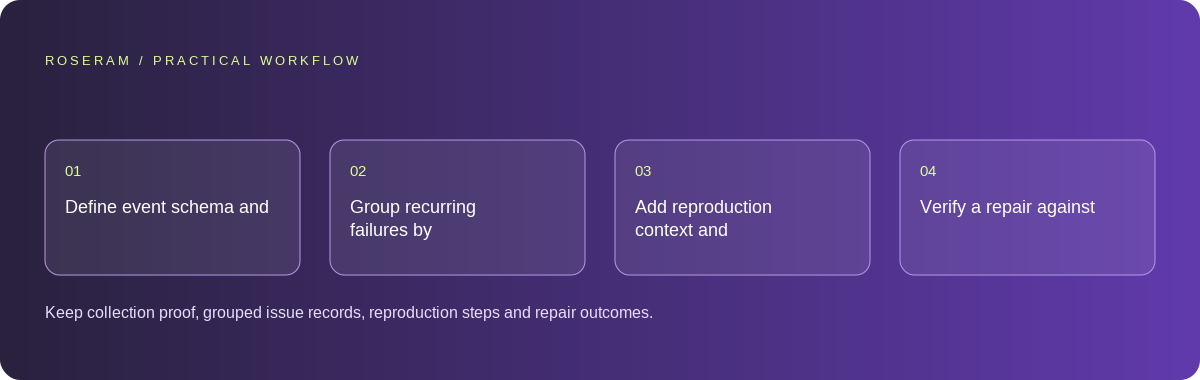
- Define event schema and redaction at collection boundaries.
- Group recurring failures by useful signature and affected revision.
- Add reproduction context and accountable owner to important issues.
- Verify a repair against the original sequence and watch subsequent occurrences.
A detailed brief you can adapt for your agent
Replace the illustrative context with your approved facts and controlled inputs. Keep the stated boundaries when adapting the brief. The expected deliverable matters more than a particular tool name: ask for an explanation grounded in the inspected material and evidence for the requested outcome.
Improve monitoring for these controlled presence and editor failures. Separate signatures and customer impact, include revision and redacted action context, and group repeated noise. Verify collection with a test event. Preserve private project boundaries. Do not suppress logging as the repair or report daily email delivery without provider evidence.
Failure modes that an attractive preview can hide
A zero-error dashboard can result from broken collection rather than a healthy product. Test the monitoring path with a controlled event. Do not promise resolution because a console message disappeared after disabling logging. Reports sent outside the system need a reviewed data boundary and verified delivery configuration, especially when attachments contain operational details.
Read more: Google: Web Vitals
Acceptance checks and the evidence to retain
Keep collection proof, grouped issue records, reproduction steps and repair outcomes. State whether reporting is prepared, scheduled or actually delivered.
| Controlled case | Expected evidence |
|---|---|
| Controlled error is triggered | It reaches the authorized diagnostic view with useful context. |
| Same endpoint fails repeatedly | Report retains counts without flooding readers with identical payloads. |
| Fix is released | Original reproduction and later occurrence trend are checked separately. |
Common questions
Does no logged error mean the app is healthy?
Not necessarily. Verify collection and actual customer journeys.
Should every console warning have equal priority?
Prioritize supported impact and causal connection to the user task.
What is the practical completion criterion?
Keep collection proof, grouped issue records, reproduction steps and repair outcomes. State whether reporting is prepared, scheduled or actually delivered.
Where the facts come from
Use these links to check the technical facts. The stories here are made-up examples to help you learn. Roseram sells AI tools; our examples are not promises of results.
- Google: Web Vitals ↗
What this source covers
LCP, INP and CLS measure loading, interaction and visual stability.
References last reviewed 2026-10-11. Writing refreshed 2026-10-14. Spot a mistake? Tell us.
