Tame the runaway status loop
Meet Nora. Nora made an AI tool named StoryCraft. StoryCraft makes short tales for writers. Writers love watching words appear on screen. But Nora found a huge bug last week. Her app sent hundreds of requests each minute. A request is a note sent to a server. The server grew hot and slow.
Think of polling like a child on a road trip. The child asks if we are there yet every second. Even when the car stops, the shouting goes on. We want to teach the web app to whisper. We want it to ask for news only when things change. It must also sleep when no one is looking.
To fix excessive polling ai app bugs, look closely at code clocks. A clock in code is called a timer. Timers tell the app when to run a task again. If you leave timers on, they eat up speed. This guide will help you calm the wild loops.
Tools and inputs to check
Before you fix code, gather your simple tools. Open the network log in your web browser. A network log shows each call sent out. You will see lines of data march down your screen. Count how many lines leave your page each second. This count gives you your starting pace.
Find all active components on the screen next. A component is a small block of visual code. Your footer, header, and main panel are all components. Check if each part runs its own timer. If many parts ask the same question, traffic doubles quickly.
Write down your three main starting inputs. First, list which screen pieces ask for news. Second, write down the seconds between each check. Third, see what happens when you hide the tab.
- Open your web browser network panel.
- List all page components that fetch data.
- Count the seconds between each status call.
A worked example with StoryCraft
Nora looked into her StoryCraft code base. She found three separate parts running checks. A footer health badge asked for news every two seconds. A status page asked for news every one second. A presence widget asked for news every three seconds. A presence widget shows if other team members are online.
Next, Nora clicked to a new screen. This route change made things much worse. A route change happens when you open a new page view. The old timer did not shut down! It kept running in the dark background. Now two timers asked for data at once. The server had to handle twice the work.
Then the status endpoint went down. An endpoint is a web address that gives answers. The app did not pause. It sent new asks with zero rest in between. The logs filled with red errors. Nora knew she had to list every caller first.
Key choices to make first
Do not guess how often to ask for news. Choose if your screen needs fast updates or slow updates. Some pages only need new facts when a client clicks. Give the client a manual refresh button. A manual refresh lets a person click to check now.
Next, check the page visibility state. This browser flag tells if a tab is hidden. When a tab is hidden, stop the clock at once. You also need to share fresh data across parts. If the footer gets a status, pass it to the widget. Never let two parts ask for the exact same note.
Plan for server drops with backoff. Backoff means you wait longer after each failed call. If call one fails, wait two seconds. If call two fails, wait four seconds. Keep a clear timestamp on screen. A timestamp is the time of the last good reply.
- Pick a sensible delay for each screen.
- Stop all calls when tabs hide.
- Share one fetched note across all widgets.
- Add longer waits when the server fails.
Concrete steps for your app
First, find every timer and effect in your code. Make one single part own the network fetch. An owner is the code block in charge of the job. When one owner handles calls, stray loops cannot start up. Delete duplicate timers inside small widgets right away.
Second, wire up a tab visibility check. When a client puts your app in the background, pause work. When the client clicks back, fetch new data once. Then restart your calm timer loop. This step cuts down waste on idle laptops.
Third, write a steady backoff rule for errors. When the server goes down, slow down your timer. Show an honest offline badge to the client. Do not bombard a hurt server with calls. Clear all timers when components leave the screen.
- Trace each part that makes a status call.
- Give fetch work to one shared owner.
- Pause timers when the screen hides.
- Wait longer after each bad reply.
Another use case: help desk queues
Let us inspect a second case: a support desk app. Support staff watch a queue for new help tickets. Staff members often leave five tabs open all day. Without good limits, those five tabs send calls without stop. The database slows down for the whole company.
We can fix this desk app with our rule. When a worker leaves a tab, that tab goes quiet. Polling stops until the worker returns. When they click the tab again, it asks for new tickets. Work continues without any loss of fresh help tickets.
The team saves server power and cash. The staff still get fast ticket news when working. Simple timer rules make big apps feel light and fast.
Mistakes and how to fix them
Watch out for unstable effect inputs. Sometimes code updates state inside a timer loop. That state update can make a brand new timer run! Now you have two timers running at once. Fix this by cleaning up old timers before making new ones.
Do not turn off calls without a refresh choice. If you stretch delays, give clients a check button. Clients feel safe when they can click to get news. Show a clear timestamp next to the button. Fresh time data builds trust with every client.
Do not assume realtime links cost zero power. Realtime sockets keep an open pipe to the server. They still use memory, power, and data. Smart polling with cleanup is often easier and lighter. Keep page checks tidy to protect fast page speed.
Always remove listeners when a component leaves. This removal step is called cleanup. If you skip cleanup, your app leaks memory over time. Tidy code helps your app run well all day long.
Read more: Google: Web Vitals
Test your polling fixes
You can test your work in three minutes. Open your browser tools and view the network panel. Type your status endpoint name into the search filter. Watch the requests pop up on your screen. Count the seconds between each new line.
Click to a new screen in your app. Make sure old timers shut down right away. Only your main owner should send out requests. Now, switch to another tab for twenty seconds. Come back and check the network log.
The log should show zero calls while you were away. Next, turn off your web connection to test drops. Watch your app wait longer between retries. Use this check table to track your test results.
| Controlled case | Expected evidence |
|---|---|
| User navigates between routes repeatedly | Only the intended active polling owners remain. |
| Tab is hidden | Work follows the approved visibility policy. |
| Endpoint remains unavailable | Requests back off and the user sees a bounded recovery state. |
Next steps to take today
Open your status component code today. Wrap your fetch logic in one central owner. Add a timer cleanup step when the page closes. Place a last-updated timestamp right on your screen. Your clients will enjoy a smooth, calm app.
If you need help checking complex code loops, Roseram can help review your timer patterns. Plan limits and access depend on your current tier. Roseram makes it simple to spot stray timers in big code bases. Smart apps must respect battery, data, and servers. Take these practical steps today to keep your app fast, neat, and stable.
Audit all callers of this status endpoint, including footer and presence components. Measure active timers and requests through navigation. Consolidate ownership, stabilize effect inputs, clean up on exit, and back off failures. Keep a manual refresh and last-updated state. Do not claim zero usage from changing polling to another transport.
Your idea. Your next step.
Put Roseram super intelligence to work.
Bring the idea you keep coming back to. Choose a Roseram plan, then give your project a clear first task. You can think it through, build a first version, and improve it as you learn.
Check current access, plan limits, and pricing before joining.
Your next step
Your quick checklist.
Tick a step as you finish it. Your ticks and feedback stay on this device. They are not public reviews.
0 of 6 complete
Tell the community what you tried or tell us what needs fixing. Include a source if you are correcting a fact.
Your questions, answered
Will changing one page interval fix all calls?
That only fixes that single spot. Check background tools and active clocks. Hidden timers might still make calls.
Is realtime automatically free of usage?
Live streams still take hard work. They use up server computing power. They can also fill device memory.
How do I know the task is done?
List all code parts asking questions. Track how often they call servers. Record fixes for network dropouts too.
Why should I pause polling in hidden tabs?
Users cannot see closed tab content. Pausing tasks saves big cloud costs. It stops laptop batteries from draining.
Want the technical details?Open the code notes, deeper checks, and common questions.
These notes go deeper. Use the parts that fit your project. Examples are for learning; they are not claims that we tested your app.
A worked example: where the task becomes difficult
A fictional site has a footer health badge, a status page and a presence widget. Each starts a separate timer, and a route transition leaves an old timer running. An unavailable endpoint receives requests continuously. Inventory all callers before changing one interval. A slower status page alone will not fix a forgotten global polling loop.
Decisions to make before implementation
Define whether data needs seconds, minutes or user-triggered refresh. Consider document visibility, component lifecycle and shared response caching. Reset or dispose timers appropriately. Use backoff and a visible unavailable state for repeated failures rather than treating every failure as an immediate retry. Keep the result timestamp so users can judge freshness.
A practical sequence for the work
Use the sequence below as a task boundary, not as a claim that the example has been executed. Work with approved inputs and the project’s actual architecture. If a required integration or permission is unavailable, keep that stage visibly incomplete rather than generating a plausible substitute result.
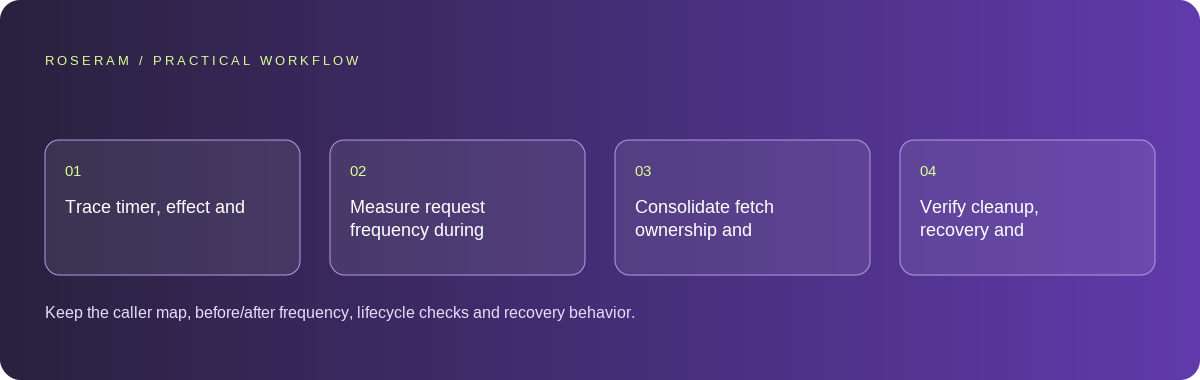
- Trace timer, effect and subscription owners for the endpoint.
- Measure request frequency during navigation and background tabs.
- Consolidate fetch ownership and apply task-appropriate intervals and backoff.
- Verify cleanup, recovery and an honest last-updated indicator.
A detailed brief you can adapt for your agent
Replace the illustrative context with your approved facts and controlled inputs. Keep the stated boundaries when adapting the brief. The expected deliverable matters more than a particular tool name: ask for an explanation grounded in the inspected material and evidence for the requested outcome.
Audit all callers of this status endpoint, including footer and presence components. Measure active timers and requests through navigation. Consolidate ownership, stabilize effect inputs, clean up on exit and back off failures. Keep a manual refresh and last-updated state. Do not claim zero usage from changing polling to another transport.
Failure modes that an attractive preview can hide
Unstable effect dependencies can recreate timers on every render even when cleanup exists. Inspect callback identity and state feedback loops. Avoid disabling all updates without giving users a refresh path. Realtime subscriptions can also consume resources; replacing polling is a design choice, not a promise of zero usage.
Read more: Google: Web Vitals
Acceptance checks and the evidence to retain
Keep the caller map, before/after frequency, lifecycle checks and recovery behavior. Confirm the deployed callers separately if only local changes were tested.
| Controlled case | Expected evidence |
|---|---|
| User navigates between routes repeatedly | Only the intended active polling owners remain. |
| Tab is hidden | Work follows the approved visibility policy. |
| Endpoint remains unavailable | Requests back off and the user sees a bounded recovery state. |
Common questions
Will changing one page’s interval fix all calls?
Only if it owns all requests; inspect global components and surviving timers too.
Is realtime automatically free of usage?
No. Connections, messages and transport work still have resource implications.
What is the practical completion criterion?
Keep the caller map, before/after frequency, lifecycle checks and recovery behavior. Confirm the deployed callers separately if only local changes were tested.
Where the facts come from
Use these links to check the technical facts. The stories here are made-up examples to help you learn. Roseram sells AI tools; our examples are not promises of results.
- Google: Web Vitals ↗
What this source covers
LCP, INP and CLS measure loading, interaction and visual stability.
References last reviewed 2026-10-11. Writing refreshed 2026-10-14. Spot a mistake? Tell us.
