Clean your digital attic with smart tools
Think of your site like a big home attic. Old boxes and broken chairs sit in the dark. Audit existing content with AI means sorting those old boxes. An audit is a close check of your old work. Smart computer tools help you sort the mess fast.
Meet Nora. Nora runs a helpful site called The Daily Byte. Her site has five hundred old tech posts. Some guides have dead links from four years back. Other posts take ten minutes to answer one small question. Nora wants her readers to find clear help fast.
Nora will not erase all her hard work today. She uses an artificial intelligence tool to read every page. The smart app spots stale facts and hard words. Together, they clean the attic room by room.
Decide what to keep and what to change
Every page on your site has one main job. Some posts teach easy setup steps to a new client. Other pages answer rare questions that save phone calls. Low traffic does not mean a page is trash. Traffic means the count of visits to a page.
Pick one clear path for each old web post. You can retain a page, which means keeping it. You can update it with fresh facts and links. Or you can merge it by joining two matching posts.
Sometimes a page needs a redirect. A redirect sends a visitor to a new web address. You can also hide dead posts from web searches. Nora makes these smart picks before writing any new words.
- Retain good posts that teach true, solid facts.
- Update guides that show old steps or dead links.
- Merge twin posts that solve the exact same goal.
- Redirect dead links to the single best surviving page.
Read more: Google: SEO starter guide
Gather your tools before you begin
You need clear notes before you open your app. Start with a tidy list called an inventory. An inventory is a sheet that lists all your pages. You can build this list in a simple grid.
Write down the web link for every single post. Add the date it went live on the web. Note the main task a client wants to solve. A task is the real problem your reader has. Add your real search query terms if you have them.
Never let the app guess your true business facts. Give the app your real text and your rules. When you bring neat notes, the app gives great help. Good food always needs clean ingredients from the start.
A simple four step audit path
First, feed your page inventory to your smart app. Ask the app to spot twin topics across pages. Twin posts confuse search engines and split your readers up. The app flags guides that chase the same search goal.
Second, inspect every fact, claim, and setup command. The app finds old code steps that fail on new gear. A human must test each step before saving changes. Your own manual check keeps all client advice safe.
Third, give every top page an action and an owner. An owner is the person who makes the fixes. Fourth, check your live site after you publish changes. Test your internal links to confirm they lead to live pages. An internal link is a bridge between your own pages.
- Find twin posts that chase the same search term.
- Spot old setup commands that cause errors today.
- Give each key page a clear owner and task.
- Test all live links so readers never hit errors.
Read more: Google: SEO starter guide
Nora audits two confusing camera guides
Let us look at a real test on Nora's site. Nora has two guides on home camera video feeds. The first post is page Alpha, made four years ago. The second post is page Beta, made last summer.
Page Alpha has a very long start about camera history. It gives an obsolete setup command that crashes new laptops. Obsolete means nobody uses that tech command today. Yet Alpha still has three great diagrams that clients love.
Page Beta has fresh setup code but zero images. Nora asks her app to compare both of these posts. The app suggests keeping page Beta as the winner. Nora moves the three good images into page Beta.
Nora then adds a redirect from page Alpha to Beta. She updates three old blog links that led to Alpha. Now, no client lands on a page with bad code. One neat guide does the work of two.
Fixing old product support articles
Now look at a second case at a bike shop. The shop has thirty old guides about tire care. Many guides mention patch kits the shop discontinued years ago. Discontinued means the shop does not sell that item now.
The shop owner pastes the post text into the app. The owner asks the app to find missing tools. The app flags old product names and broken warranty links. It marks three short posts to join into one page.
The owner keeps one low-traffic guide on vintage wheel repair. That page gets few visits, but it stops angry calls. The audit keeps good repair tips and cuts stale fluff. Clear help builds trust with every local bike client.
Watch out for common audit mistakes
Do not trust an arbitrary number score from an app. Arbitrary means picked at random with no good proof. An app might grade a short post down by mistake. Short answers are often the best help for busy people.
Another big slip is deleting pages without adding redirects. If other sites link to your old address, visitors see errors. A missing page hurts trust and makes your client leave. Map your new links before you remove any old page.
Remember our caution: more words do not mean a better answer. Padding a post with fluff wastes your reader's time. Cut the long intros and give the true fix first.
Read more: Google: SEO starter guide
Check your work with a clear table
A good audit leaves a clean trail of proof behind. Keep your list of approved fixes and page owners. When you change a link or merge posts, test it. Never guess if a button takes a client home.
Review your work with this simple check table below. Match your audit findings with the proof you must keep. If proof is missing, finish the step before you launch. Good habits keep your site helpful and strong every day.
| Controlled case | Expected evidence |
|---|---|
| Article references an obsolete setup command | The update uses verified current instructions or labels historical context. |
| Two pages answer the same task | The consolidation preserves useful material and canonical navigation. |
| A CTA changes during revision | The actual destination still matches its stated purpose. |
Read more: Google: SEO starter guide
Run a fast test on one article
You do not need to audit your whole site today. Pick one single post that has not changed in years. Copy the text into your app and run a test. Ask the app to find three facts that seem old.
Check those three facts yourself using your own real knowledge. Did the tool find a broken link or stale step? If yes, fix that single spot on your live site. You just finished your very first mini content audit.
This quick test builds your skill without any stress. You will see how helpful smart apps are for editing. Small, regular cleanups keep your digital attic clean all year.
Practical next steps for your website
Now you can plan your full project workflow. Export your list of web links into a clean sheet. Mark your top ten most visited posts as your priority. Set aside one quiet hour this week to inspect them.
Roseram can help with a task like scanning your inventory. Access and limits depend on your current plan. Using focused tools keeps your team organized without any mess. Clear thinking, true facts, and neat links always win the day. Open your page list and start your audit right now.
Audit this page inventory for factual freshness, overlapping intent, broken links and mismatched promises. Give evidence-backed actions rather than a generic numeric score. Preserve historical reporting context and useful low-traffic support material. For each proposed merge, identify the surviving page and affected internal links. Do not delete or publish changes during analysis. Context: Page Alpha is 'How to stream home video (2020)' with old code but great diagrams. Page Beta is 'Setup webcam video (2023)' with clean code but no images. Recommend the surviving URL and list needed updates.
Your idea. Your next step.
Put Roseram super intelligence to work.
Bring the idea you keep coming back to. Choose a Roseram plan, then give your project a clear first task. You can think it through, build a first version, and improve it as you learn.
Check current access, plan limits, and pricing before joining.
Your next step
Your quick checklist.
Tick a step as you finish it. Your ticks and feedback stay on this device. They are not public reviews.
0 of 7 complete
Tell the community what you tried or tell us what needs fixing. Include a source if you are correcting a fact.
Your questions, answered
Should low-traffic pages always be deleted?
No, do not delete them yet. Check the goal of each page. Look at its facts and overlap. Then choose what to do next.
Can AI certify a perfect SEO score?
AI can check your set rules. SEO means helping search apps find pages. But a high score changes nothing. It cannot promise good web ranks.
How do I know the task is done?
Keep a list of page fixes. List the owners and the sources. Check your work after each change. Use traffic data, but stay careful.
Why merge posts that answer the same task?
Twin posts fight for the same readers. Merging puts all facts together. Now readers find one clear page.
Want the technical details?Open the code notes, deeper checks, and common questions.
These notes go deeper. Use the parts that fit your project. Examples are for learning; they are not claims that we tested your app.
A worked example: where the task becomes difficult
A fictional AI publication has old reviews, short news posts and tutorials using outdated setup steps. Adding more articles will not fix those failures. Begin with page URLs, publication dates, available query data and a few representative customer tasks. An article can be useful but outdated, technically inaccessible or duplicative; keep those diagnoses separate so the remedy matches the problem.
Decisions to make before implementation
Choose an action for each page: retain, update, merge, redirect or remove from public indexing where justified. Preserve valuable history with clear context rather than rewriting every old story as current. Check claims, source links, metadata and conversion destinations. Traffic alone does not define quality: a low-traffic page may resolve an important support task.
A practical sequence for the work
Use the sequence below as a task boundary, not as a claim that the example has been executed. Work with approved inputs and the project’s actual architecture. If a required integration or permission is unavailable, keep that stage visibly incomplete rather than generating a plausible substitute result.
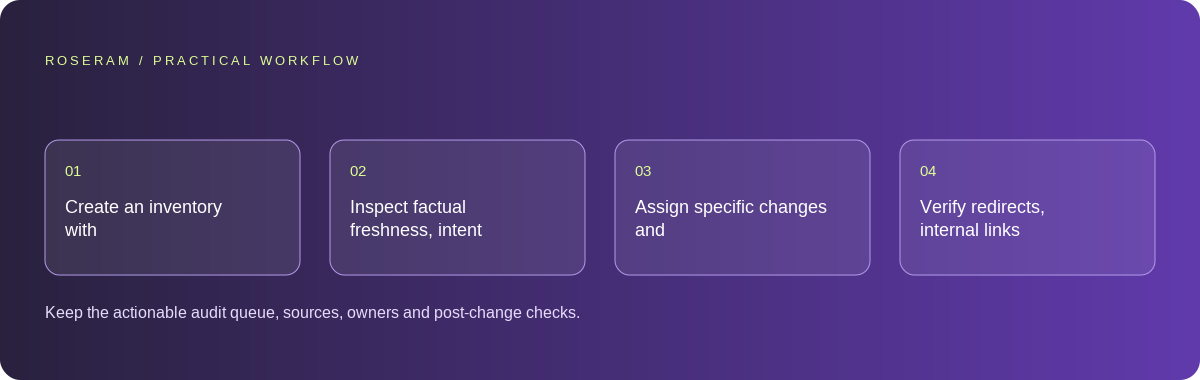
- Create an inventory with purpose, dates and available performance evidence.
- Inspect factual freshness, intent overlap and technical accessibility.
- Assign specific changes and a correction owner to priority pages.
- Verify redirects, internal links and user journeys after implementing the audit.
A detailed brief you can adapt for your agent
Replace the illustrative context with your approved facts and controlled inputs. Keep the stated boundaries when adapting the brief. The expected deliverable matters more than a particular tool name: ask for an explanation grounded in the inspected material and evidence for the requested outcome.
Audit this page inventory for factual freshness, overlapping intent, broken links and mismatched promises. Give evidence-backed actions rather than a generic numeric score. Preserve historical reporting context and useful low-traffic support material. For each proposed merge, identify the surviving page and affected internal links. Do not delete or publish changes during analysis.
Failure modes that an attractive preview can hide
An AI score can create false precision about “SEO quality.” Ask for concrete findings with URLs and evidence. Do not delete every page below an arbitrary visit threshold. When merging articles, retain unique useful information and update links; leaving references to removed URLs creates a new usability problem.
Read more: Google: SEO starter guide
Acceptance checks and the evidence to retain
Keep the actionable audit queue, sources, owners and post-change checks. Use measured performance where available without pretending it explains every content-quality issue.
| Controlled case | Expected evidence |
|---|---|
| Article references an obsolete setup command | The update uses verified current instructions or labels historical context. |
| Two pages answer the same task | The consolidation preserves useful material and canonical navigation. |
| A CTA changes during revision | The actual destination still matches its stated purpose. |
Common questions
Should low-traffic pages always be deleted?
No. Inspect their purpose, evidence and overlap before deciding.
Can AI certify a perfect SEO score?
It can check defined conditions, but a score does not guarantee indexing, authority or rankings.
What is the practical completion criterion?
Keep the actionable audit queue, sources, owners and post-change checks. Use measured performance where available without pretending it explains every content-quality issue.
Where the facts come from
Use these links to check the technical facts. The stories here are made-up examples to help you learn. Roseram sells AI tools; our examples are not promises of results.
- Google: SEO starter guide ↗
What this source covers
Discovery, descriptive titles, useful content and understandable links.
References last reviewed 2026-10-11. Writing refreshed 2026-10-14. Spot a mistake? Tell us.
