A worked example: where the task becomes difficult
A fictional tutorial includes a workflow diagram, a decorative gradient and an icon-only download button. They need different treatment. The diagram communicates stages, the gradient adds no information and the button needs a functional name. Giving all three the same keyword-filled description makes the page harder to use. Start with image purpose and context before asking for draft text.
Decisions to make before implementation
Determine whether the image is informative, decorative, complex or part of an action. A complex chart may need a short alternative plus a fuller nearby explanation. Avoid repeating a caption word for word when it adds no value. Do not identify people, brands or measurements that the image does not clearly establish. Keep essential instructions in text, not only inside an image.
A practical sequence for the work
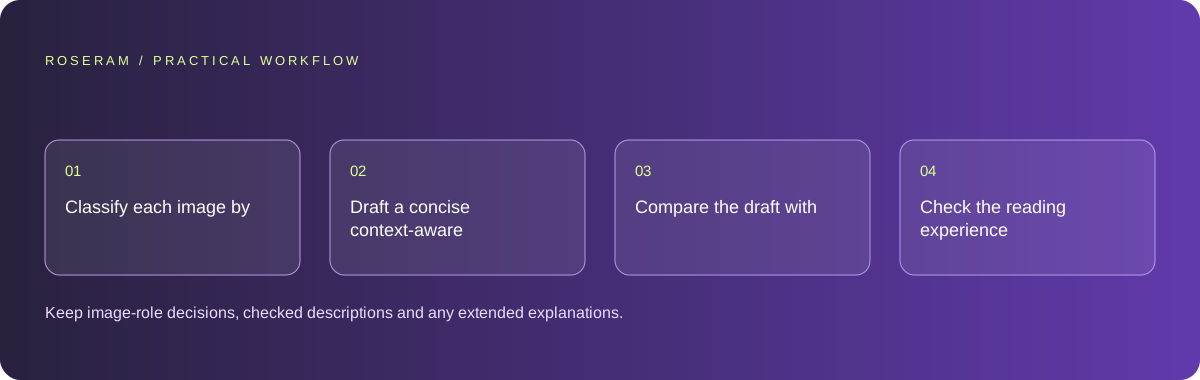
Use the sequence below as a task boundary, not as a claim that the example has been executed. Work with approved inputs and the project’s actual architecture. If a required integration or permission is unavailable, keep that stage visibly incomplete rather than generating a plausible substitute result.
- Classify each image by its role in the page.
- Draft a concise context-aware description or appropriate decorative treatment.
- Compare the draft with the actual asset and nearby text.
- Check the reading experience and functional names in the rendered page.
A detailed brief you can adapt for your agent
Replace the illustrative context with your approved facts and controlled inputs. Keep the stated boundaries when adapting the brief. The expected deliverable matters more than a particular tool name: ask for an explanation grounded in the inspected material and evidence for the requested outcome.
Draft alternatives for these images using their actual page roles. Distinguish the informative workflow, decorative gradient and functional download icon. Do not invent visible objects or add keywords for their own sake. Identify complex information that needs a nearby textual explanation and verify the final rendered names.Failure modes that an attractive preview can hide
A model can hallucinate objects or read garbled generated text as a real label. Review every description. Keyword stuffing does not make an alternative more informative. Avoid a universal character limit that forces important meaning out; use concise text suitable to the role and provide extended explanation for genuinely complex information.
Technical references: W3C WAI: accessibility tutorials
Acceptance checks and the evidence to retain
Keep image-role decisions, checked descriptions and any extended explanations. The result should help someone who cannot see the asset complete the same task.
| Controlled case | Expected evidence |
|---|---|
| Workflow diagram is unavailable visually | The reader can still understand the sequence from text. |
| Decorative gradient is encountered | It does not add distracting meaningless narration. |
| Icon-only download control is focused | Its accessible name explains the action. |
Specific answers
Common questions
Should every image have a long description?
No. Role and complexity determine the useful treatment.
Can AI-generated alt text be published without review?
Check it against the actual image and context to catch invented or irrelevant details.
What is the practical completion criterion?
Keep image-role decisions, checked descriptions and any extended explanations. The result should help someone who cannot see the asset complete the same task.
Sources and editorial method
These references support the indicated technical facts. Workflows, examples and decision tables are original Roseram analysis. Illustrative costs are not vendor prices. No search volume, organic difficulty, ranking result or product endorsement is implied.
- W3C WAI: accessibility tutorials ↗
Reference material for accessible content and media; an individual checklist does not establish complete conformance.
Roseram offers AI software and may compete with tools discussed here. Sources checked 2026-10-11. Send a sourced correction.
Your next step
Keep a practical checklist.
Mark your progress. This checklist and helpfulness choice are saved on this device only; they are not public reviews.
0 of 5 complete
Share your experience in the community or submit a sourced correction. Public experiences remain separate from editorial claims.
Bring your next idea
Keep learning. Build with context.
Get Roseram model and workspace reopening updates. The guide remains available whether or not you subscribe.
Explore the workspace guide →