A worked example: where the task becomes difficult
A fictional learning site has four generated hero images. One is striking at full size but noisy behind text, one contains a confusing pseudo-logo and another looks plain yet works well on mobile. Put them into the intended layout rather than judging isolated files. A choice should reflect the visitor task and page constraints, not only the most dramatic thumbnail.
Decisions to make before implementation
Set must-pass conditions before aesthetic scoring: truthful representation, no unintended branding, readable overlays and suitable crops. Consider file weight and dimensions. Review consistency with other assets without requiring identical imagery everywhere. If a candidate needs extensive cleanup, include that effort in the decision rather than comparing only initial appeal.
A practical sequence for the work
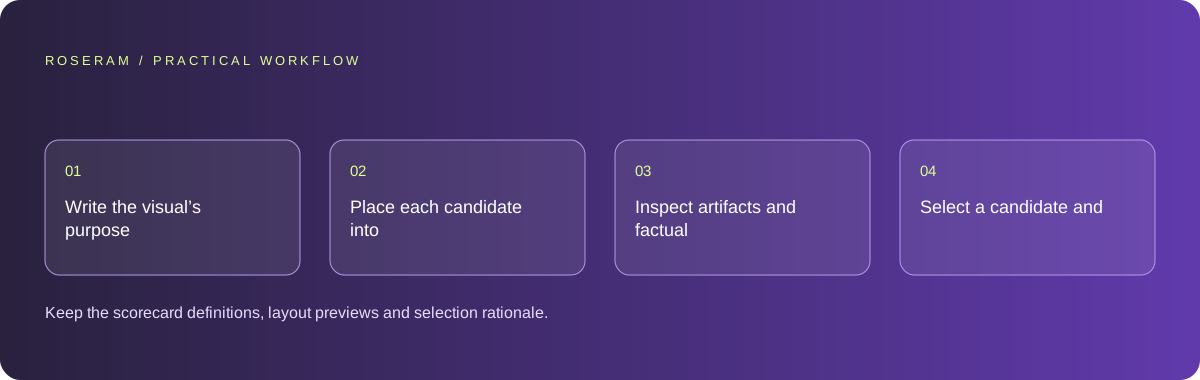
Use the sequence below as a task boundary, not as a claim that the example has been executed. Work with approved inputs and the project’s actual architecture. If a required integration or permission is unavailable, keep that stage visibly incomplete rather than generating a plausible substitute result.
- Write the visual’s purpose and must-pass constraints.
- Place each candidate into representative desktop and phone layouts.
- Inspect artifacts and factual implications at final display size.
- Select a candidate and record why alternatives failed or need revision.
A detailed brief you can adapt for your agent
Replace the illustrative context with your approved facts and controlled inputs. Keep the stated boundaries when adapting the brief. The expected deliverable matters more than a particular tool name: ask for an explanation grounded in the inspected material and evidence for the requested outcome.
Evaluate these permitted image candidates in the supplied page layout. Use must-pass checks for truthful context, unintended branding, text space and phone crops. Compare message clarity, artifacts and optimization effort. Do not claim conversion performance from preference. Return a selected candidate with concrete revision notes.Failure modes that an attractive preview can hide
A numeric score can disguise arbitrary taste. Define each criterion and include notes. Avoid inventing conversion results from visual preference alone. Generated images may include accidental readable or near-readable branding; inspect rather than assuming the prompt prevented it. Preserve source and usage records for assets supplied from outside the project.
Technical references: W3C WAI: accessibility tutorials
Acceptance checks and the evidence to retain
Keep the scorecard definitions, layout previews and selection rationale. A future editor should understand the functional choice, not only the preferred style.
| Controlled case | Expected evidence |
|---|---|
| Candidate sits behind headline text | Contrast and composition support reading. |
| Small crop removes important content | The candidate is rejected or a different crop is designed. |
| Image suggests a specific real brand | The implication is reviewed before publication. |
Specific answers
Common questions
Can I choose from thumbnails alone?
Inspect the intended display sizes, crops and overlays before deciding.
Does the prettiest image convert best?
Visual preference does not establish conversion performance; measure that separately if relevant.
What is the practical completion criterion?
Keep the scorecard definitions, layout previews and selection rationale. A future editor should understand the functional choice, not only the preferred style.
Sources and editorial method
These references support the indicated technical facts. Workflows, examples and decision tables are original Roseram analysis. Illustrative costs are not vendor prices. No search volume, organic difficulty, ranking result or product endorsement is implied.
- W3C WAI: accessibility tutorials ↗
Reference material for accessible content and media; an individual checklist does not establish complete conformance.
Roseram offers AI software and may compete with tools discussed here. Sources checked 2026-10-11. Send a sourced correction.
Your next step
Keep a practical checklist.
Mark your progress. This checklist and helpfulness choice are saved on this device only; they are not public reviews.
0 of 5 complete
Share your experience in the community or submit a sourced correction. Public experiences remain separate from editorial claims.
Bring your next idea
Keep learning. Build with context.
Get Roseram model and workspace reopening updates. The guide remains available whether or not you subscribe.
Explore the workspace guide →