A worked example: where the task becomes difficult
A fictional appointment app uses unlabeled icon buttons for reschedule and cancel. A screen reader announces only “button,” and larger text truncates the appointment time. Begin with the booking-detail journey, naming controls by purpose and checking the runtime’s actual accessibility props. Keep the destructive action distinguishable from the ordinary edit action without relying only on color.
Decisions to make before implementation
Separate visual text, accessible name, role, state and hint. Avoid labels that repeat irrelevant decoration or describe an icon rather than its action. Preserve focus after a modal closes and communicate errors near the affected field. Check dynamic updates and loading states without overwhelming announcements. Include reduced motion where animation affects comfort or comprehension.
A practical sequence for the work
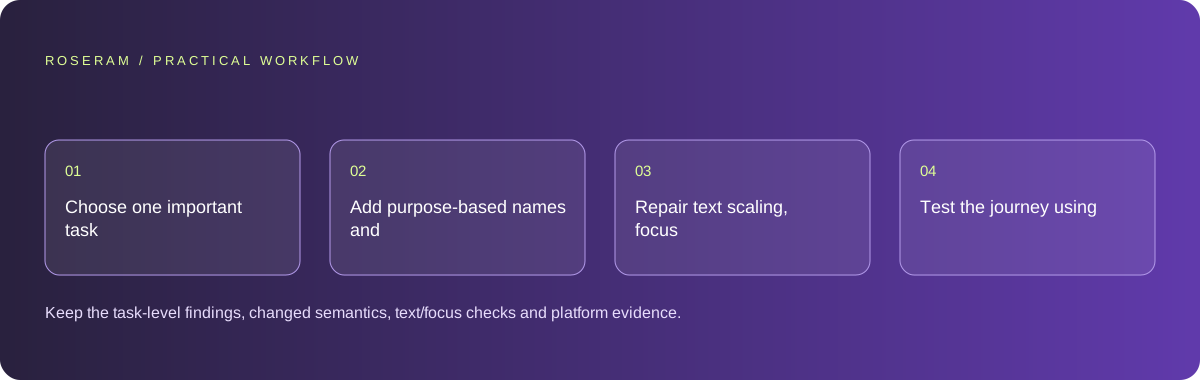
Use the sequence below as a task boundary, not as a claim that the example has been executed. Work with approved inputs and the project’s actual architecture. If a required integration or permission is unavailable, keep that stage visibly incomplete rather than generating a plausible substitute result.
- Choose one important task and inspect its current accessible structure.
- Add purpose-based names and appropriate role and state information.
- Repair text scaling, focus return and error association.
- Test the journey using the target platform’s accessibility tools.
A detailed brief you can adapt for your agent
Replace the illustrative context with your approved facts and controlled inputs. Keep the stated boundaries when adapting the brief. The expected deliverable matters more than a particular tool name: ask for an explanation grounded in the inspected material and evidence for the requested outcome.
Improve the appointment-detail journey using this mobile runtime’s accessibility contract. Name icon actions by purpose, expose relevant states and preserve focus through confirmation. Support larger text and reduced motion where needed. Test with platform tools and report the actual coverage; do not claim complete accessibility certification from labels alone.Failure modes that an attractive preview can hide
Automated inspection can find missing labels but miss confusing navigation or announcements. Avoid claiming conformance from a single scanner. An icon’s filename is not a useful accessible name. Native and web accessibility APIs differ, so apply the current runtime contract rather than copying arbitrary HTML attributes into native components.
Technical references: Expo: start developing
Acceptance checks and the evidence to retain
Keep the task-level findings, changed semantics, text/focus checks and platform evidence. Prioritize failures that prevent completing the journey.
| Controlled case | Expected evidence |
|---|---|
| Screen reader reaches reschedule control | Its purpose and relevant state are understandable. |
| User increases text size | Appointment details and required actions remain readable. |
| Confirmation modal closes | Focus returns to a sensible point in the task. |
Specific answers
Common questions
Are accessible labels enough?
They are one part; focus, state, errors, text adaptation and task flow also matter.
Can a web-only audit verify a native app?
It does not cover every native interaction; use the target platform tools as well.
What is the practical completion criterion?
Keep the task-level findings, changed semantics, text/focus checks and platform evidence. Prioritize failures that prevent completing the journey.
Sources and editorial method
These references support the indicated technical facts. Workflows, examples and decision tables are original Roseram analysis. Illustrative costs are not vendor prices. No search volume, organic difficulty, ranking result or product endorsement is implied.
- Expo: start developing ↗
Running the development server and checking changes on a device.
Roseram offers AI software and may compete with tools discussed here. Sources checked 2026-10-11. Send a sourced correction.
Your next step
Keep a practical checklist.
Mark your progress. This checklist and helpfulness choice are saved on this device only; they are not public reviews.
0 of 5 complete
Share your experience in the community or submit a sourced correction. Public experiences remain separate from editorial claims.
Bring your next idea
Keep learning. Build with context.
Get Roseram model and workspace reopening updates. The guide remains available whether or not you subscribe.
Explore the workspace guide →