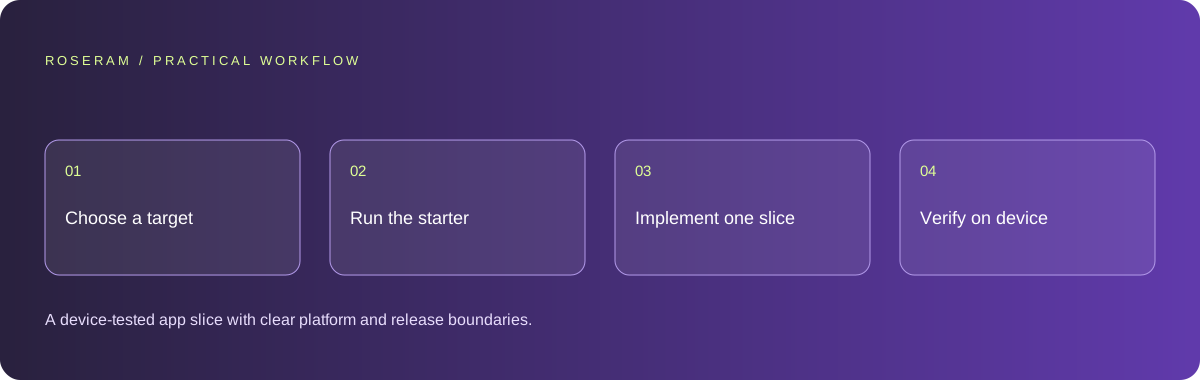
Choose the target platform before asking for an app
Begin with a specific user action and target device. A field worker recording an inspection has different requirements from a reader browsing articles. Write down whether the app needs offline storage, camera access, push notifications, background work or platform integrations. Those requirements help decide between a website, a cross-platform app and a native implementation.
For a JavaScript team, Expo and React Native provide one possible starting point. Expo’s official project guide identifies its framework as a React Native framework and supplies a project creation command. Native iOS and Android projects use different toolchains. Choose the toolchain for the required behavior and available testing hardware, not because an agent can generate attractive screens in it.
Separate code generation from release authority. Codex can help work on source, but signing identities, developer accounts, review requirements and store approval are separate concerns. Do not promise delivery to both stores until the required accounts, devices and build workflow are confirmed.
| Target | Good starting question | Evidence needed |
|---|---|---|
| Mobile website | Can this task work in a browser? | Real mobile browser test |
| Cross-platform app | Do required capabilities fit this framework? | Android and iOS device behavior |
| Native application | Which platform capability is essential? | Platform build, signing and device test |
Technical references: Expo: create a project · OpenAI: Codex learning resources
Run the starter before letting the agent change it
Create a clean project in a separate directory. Verify the current framework instructions and prerequisites before running commands. Save the baseline so a failed modification can be compared with a known working state. If the untouched starter cannot run, resolve the environment problem first; changing application code will not fix an unavailable toolchain.
The following command is from Expo’s project creation guide. The directory name is illustrative. Review package installation prompts and the template’s generated README before continuing. Starting a development server is not the same as producing a signed distribution build.
Open the starter on the intended device or emulator and make a small text change. Confirm that the device displays that change. This simple round trip establishes that the correct files, server and device are connected. If the screen is stale, solve that before asking the agent to build several features.
npx create-expo-app@latest inspection-notebook
cd inspection-notebook
npx expo start
Technical references: Expo: create a project · Expo: start developing
Give Codex a bounded implementation request
Use a project brief with the screen, data model, expected states and acceptance criteria. For an inspection notebook, the first slice might let a user create a draft locally, reopen it and delete it. Keep account sync, shared workspaces and attachments out of the first slice unless they are required to prove the core task.
Tell the agent what it may edit and what must remain compatible. Ask it to inspect the project conventions before choosing dependencies. Require an explanation of any native dependency and its effect on the build. Review the diff and run the application after the change; an agent’s completion message is not the device evidence.
Represent empty, pending and failed states deliberately. A blank list needs an explanation and a next step. A save button needs duplicate-submission protection where appropriate. Failed synchronization must not silently discard the user’s local work. These are product requirements that a generic “build an app” prompt often omits.
Inspect the mobile project and preserve its conventions.
Implement a local inspection draft: create, edit, reopen and delete.
Define the data shape before editing.
Include empty, saving and recoverable error states.
Do not add cloud sync or embed credentials.
Report changed files and device checks still required.
Technical references: OpenAI: prompting guidance
Check behavior a browser preview cannot prove
Test keyboard overlap, navigation history, safe areas, font scaling and rotation where supported. Try the smallest intended device and a longer-than-normal label. Screen geometry matters because real customer information does not stay inside the neat examples used in a generated mockup.
For a camera or file feature, test permission denial and a second attempt after changing permission. For offline work, disable connectivity, create data, close the app, reopen it and reconnect. Verify which state is authoritative. If two devices edit the same record, decide how conflicts should be resolved before claiming synchronization is reliable.
Separate device tests from package tests. A development session can work while the production package fails because environment variables, assets or native configuration differ. Keep a release checklist for the actual build variant and distribute that variant to a small test group before relying on it.
- Keyboard does not cover the active field or action.
- Denied permissions produce an explanation and recovery route.
- Local data survives restart when persistence is required.
- Offline and reconnect behavior follow a written rule.
- The installable build—not only the preview—has been checked.
Keep server authority out of the mobile bundle
Treat the installed application as an untrusted client. Anything packaged into it may be inspected. Put privileged service operations behind a server that authenticates the user and checks authorization. A client-side check that hides a button does not enforce who can read or modify a record.
Use test users with separate data to probe access boundaries. Attempt to open the second user’s record using the first user’s session. Reject unauthorized access on the server. If a credential has already been exposed, removing it from a current file is not sufficient; revoke or rotate it and inspect where it was distributed.
Technical references: GitHub: removing sensitive data · OWASP Top 10
Define the release evidence and the remaining work
Record the target platform, tested build identifier, devices checked, known limitations and approval owner. Keep store descriptions faithful to demonstrated behavior. Do not claim offline support because the screen looks similar without a connection; verify persistence and recovery on a real device.
Roseram can help plan, inspect and edit project source. Confirm runtime and publication support for your particular imported project. For native code, use the required external device and platform build workflow. The useful handoff is a reproducible project and an evidence list, not a promise that every preview is store-ready.
Historical product introduction, not a current mobile tutorial. The text workflow below covers device verification separately.
Specific answers
Common questions
Can Codex create both iPhone and Android apps?
It can assist with code for different platforms. The chosen framework, platform toolchains, permissions and actual testing determine whether your project supports each platform.
Is Expo Go a finished app release?
No. A development workflow helps you inspect changes. An installable distribution build and any store submission need separate verification.
Do I need the OpenAI API for every Codex-built app?
No. Using a coding agent to create an ordinary application does not itself make that application call a model API. Runtime AI features need their own backend design.
Sources and editorial method
These references support the indicated technical facts. Workflows, examples and decision tables are original Roseram analysis. Illustrative costs are not vendor prices. No search volume, organic difficulty, ranking result or product endorsement is implied.
- Expo: create a project ↗
React Native project creation, supported development systems and starter command.
- OpenAI: Codex learning resources ↗
Official demonstrations and product learning resources; capabilities vary by surface and account.
- Expo: start developing ↗
Running the development server and checking changes on a device.
- OpenAI: prompting guidance ↗
Context, clear instructions and reviewable agent tasks.
- GitHub: removing sensitive data ↗
Revoking exposed credentials and the limits of deleting them from the current file.
- OWASP Top 10 ↗
A starting framework for web application risk, not a security certification.
Roseram offers AI software and may compete with tools discussed here. Sources checked 2026-10-11. Send a sourced correction.
Your next step
Keep a practical checklist.
Mark your progress. This checklist and helpfulness choice are saved on this device only; they are not public reviews.
0 of 5 complete
Share your experience in the community or submit a sourced correction. Public experiences remain separate from editorial claims.
Bring your next idea
Keep learning. Build with context.
Get Roseram model and workspace reopening updates. The guide remains available whether or not you subscribe.
Explore the workspace guide →