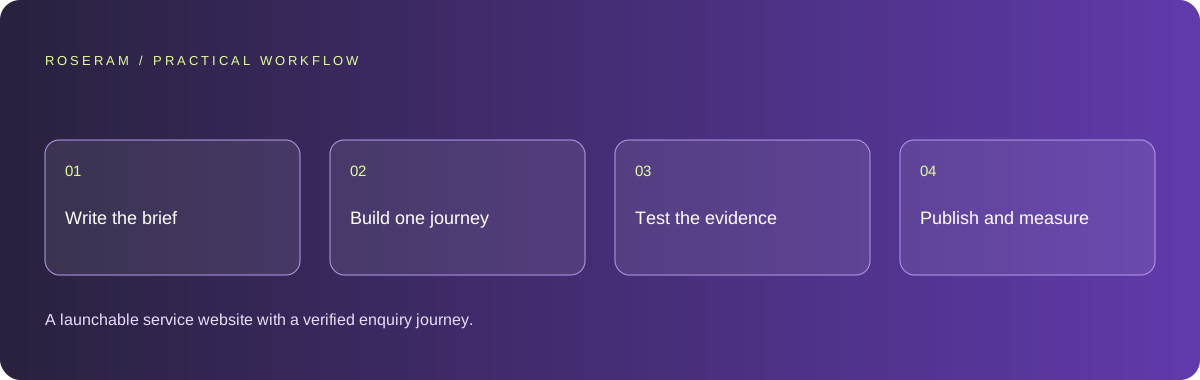
Turn a business idea into a buildable website brief
A useful first prompt describes a visitor and a decision. For an appointment-based business, that might be a customer deciding whether your service covers their area and how to request a quote. Give the agent your real services, service area, opening hours, contact details, brand assets and approved claims. Mark unknown information explicitly. A plausible invented address is worse than a visibly unfinished field.
Write acceptance criteria before choosing colors. The customer must understand the offer, see a credible reason to trust it, reach a contact method and receive a clear outcome after submitting. Specify what happens to the submission, who receives it and how errors are presented. A visible form is not evidence of a delivered enquiry.
Keep a short decision log beside the project. Record the intended audience, primary conversion, pages required at launch and features postponed. When a later prompt adds a chatbot, store or account system, check whether that feature helps the original customer task or expands the maintenance burden. A smaller coherent launch is easier to verify than a collection of attractive disconnected screens.
- Audience: who is visiting, on what device, and why?
- Offer: approved products, services, prices and boundaries.
- Conversion: enquiry, booking, purchase or subscription.
- Evidence: genuine photographs, credentials and customer permission.
- Ownership: domain, source, hosting account and access recovery.
Choose a page structure that matches the business
A brochure site and an application have different requirements. A few service pages can often be delivered with static HTML or a straightforward content framework. Accounts, personalized records and purchases introduce server behavior, authorization and storage. Decide which you need before asking for an elaborate stack. Complexity should have a customer-facing reason.
For a local service site, begin with Home, a focused service page, About, Contact and necessary policies. Each service page should answer its own customer questions instead of swapping a city name into identical copy. Include eligibility, preparation, deliverables, limitations and the next step. Avoid inventing customer testimonials to fill an empty design.
Map navigation with ordinary descriptive labels. Ask someone unfamiliar with the project where they would click to find pricing or contact the business. If the answer depends on knowing your internal vocabulary, rename the link. Keep the primary action visible without covering the content or forcing a signup before the visitor can evaluate the offer.
| Project | First implementation | Verify before expanding |
|---|---|---|
| Service website | Static or server-rendered pages plus a real enquiry endpoint | The enquiry reaches its destination |
| Content publication | Articles with stable URLs and editorial controls | Updates, sources and navigation |
| Customer application | Accounts, authorized API and persistent data | Two users cannot access each other’s records |
Build one working slice before generating every page
Ask for a complete home-to-enquiry journey first. It should include navigation, the landing page, a form, server validation and success/error states. Review the changed files and inspect the running page. If the initial output is purely visual, describe it as a prototype until the action behind the button is connected.
Use a targeted revision request: describe the observed result, expected result, route and device. “The contact button scrolls behind the fixed header on a small screen; make the destination heading visible” is actionable. “Make everything better” leaves the agent guessing. Preserve a recoverable revision before changes that span layout, routing and data.
When using Roseram, keep the project brief and acceptance criteria in the workspace, inspect proposed edits and check the preview after each coherent change. Imported frameworks and native applications may need an appropriate runtime. A browser preview is useful evidence for a website, but it does not demonstrate a working backend or native mobile release.
Create a service website using the supplied business facts.
Primary action: request a quote.
Deliver one complete enquiry journey first.
Do not invent testimonials, addresses or certifications.
Show validation, pending, success and retryable error states.
List changed files, required configuration and verification evidence.
Edit the generated copy and media for credibility
Replace generic promises with concrete answers: what is delivered, where, when and under which conditions. A heading should orient the visitor, not announce that your company is innovative. Use bold for a decision or important condition, italics sparingly for examples, and underlined links for navigation. Formatting is a reading aid, not a substitute for evidence.
Use original or appropriately licensed images. Supply meaningful alternative text for informative images and empty alternative text for decorative ones. Reserve image dimensions so the layout does not jump as assets arrive. An embedded video should explain something the surrounding text cannot explain as clearly; do not preload several videos before the visitor chooses to watch.
Keep customer quotations faithful to the approved record. A review with no written comment should not become a fabricated testimonial. If you have no public proof yet, show a real process, sample deliverable or transparent explanation of what customers can expect. Link to an official certification record when making a certification claim.
Technical references: Google: semantic HTML · Google: Web Vitals
Test the website as a customer before launch
Check narrow screens, a slower connection, keyboard navigation and the browser back button. Open the menu, close it, submit invalid information, submit valid information and retry after a simulated failure. Watch for invisible overlays that intercept taps. A desktop screenshot cannot prove the mobile actions work.
Create a small evidence table for the launch decision. A successful enquiry needs an actual recorded submission or received test message; a working checkout needs a verified test transaction and correct fulfilment; an indexed page needs crawlable output and an indexing check. Do not combine these into a single vague “passed” badge.
Give public pages descriptive titles, unique summaries and stable canonical URLs. Keep private application screens out of indexing. Check redirects, missing pages, image loading and links from a clean browser session. Use the deployment and SEO guides below for the checks that happen after the preview is approved.
- Mobile menu and primary CTA respond to taps.
- Real form submission has a recorded outcome.
- Loading and errors leave the visitor able to recover.
- Public pages return successful responses and meaningful HTML.
- Contact information, claims and images are approved.
Technical references: Google: SEO starter guide · Playwright: testing best practices
Measure whether the site delivers useful enquiries
Define the conversion event around the outcome, not simply the button click. Track successful submissions separately from form opens, validation failures and abandoned attempts. A page with fewer visits but more qualified enquiries can be more valuable than a high-traffic page that attracts the wrong audience.
Review support questions and failed journeys as content opportunities. If visitors repeatedly ask whether a service covers a location or includes a particular deliverable, answer that on the appropriate service page. Update the evidence and date when you make a substantive correction; changing a timestamp alone does not make information fresh.
Specific answers
Common questions
Can I build a website with AI without coding?
You can generate a prototype without writing every line. You still need to verify content, integrations, accessibility and deployment. The complexity of the customer journey determines how much technical review is needed.
How long does an AI website take?
A first draft can be quick; a dependable launch also includes factual review, connection setup, testing and publication. Estimate those stages separately instead of treating generation time as launch time.
Does a website need an AI API key?
A normal website created with an AI coding tool does not inherently need an AI API at runtime. A feature that calls a model does need a configured backend and appropriate credentials.
Sources and editorial method
These references support the indicated technical facts. Workflows, examples and decision tables are original Roseram analysis. Illustrative costs are not vendor prices. No search volume, organic difficulty, ranking result or product endorsement is implied.
- Google: semantic HTML ↗
Meaningful document structure supports readers and accessibility tools.
- Google: Web Vitals ↗
LCP, INP and CLS measure loading, interaction and visual stability.
- Google: SEO starter guide ↗
Discovery, descriptive titles, useful content and understandable links.
- Playwright: testing best practices ↗
Tests based on user-visible behavior and isolated test state.
Roseram offers AI software and may compete with tools discussed here. Sources checked 2026-10-11. Send a sourced correction.
Your next step
Keep a practical checklist.
Mark your progress. This checklist and helpfulness choice are saved on this device only; they are not public reviews.
0 of 5 complete
Share your experience in the community or submit a sourced correction. Public experiences remain separate from editorial claims.
Bring your next idea
Keep learning. Build with context.
Get Roseram model and workspace reopening updates. The guide remains available whether or not you subscribe.
Explore the workspace guide →