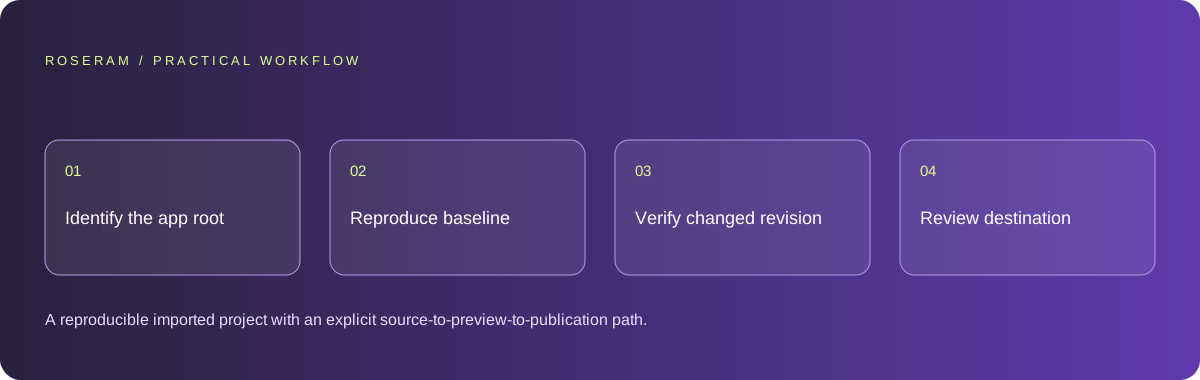
Understand what an import actually gives you
A repository contains source and history, not necessarily a complete running environment. Cloning or importing obtains a working copy. It does not supply every secret, database, external service, operating-system package or build artifact the application relies on. The imported directory might also contain several applications with different commands.
Establish where edits will be made. For a hosted workspace, identify the active project, branch and revision. For a local folder, confirm whether the workspace has a copied file snapshot or an explicit directory handle that can write back. Never assume that a change visible in an editor has replaced the file on your desktop or updated GitHub.
Record the original commit and use a branch or recoverable snapshot before the first agent change. The baseline is your comparison point when an apparently unrelated configuration edit breaks the preview. Keep publication separate from import so a repair can be reviewed before it reaches the source others depend on.
Technical references: GitHub: cloning a repository
Find the real application directory and runtime
Read the README and inspect the directory tree. A root package file may orchestrate a monorepo while the website lives under an apps directory. A repository might be a native app, server, library, game engine or documentation project rather than a browser application. Identify its language and output before choosing a preview mechanism.
For a JavaScript website, inspect package scripts, package-manager lockfiles, workspace definitions and the framework entry point. Use the documented package manager and command. Do not add a random development script just to suppress an unsupported-runtime message. That can conceal the actual project type and make the next failure harder to explain.
Separate source loading from path indexing. Seeing a file name in a tree does not mean the agent has read its contents. Ensure that package configuration, entry points and files involved in the requested change are actually loaded. Ask for additional source when needed rather than letting the model guess how an unavailable module behaves.
| Signal | Possible meaning | Next check |
|---|---|---|
| Several package.json files | Monorepo or multiple tools | Find the user-facing app and workspace command |
| Native platform directories | Mobile or desktop application | Identify device/build requirements |
| README describes a server | Backend without browser UI | Check endpoints rather than expecting a page preview |
| Generated bundle only | Source may be missing | Locate original source and reproducible build |
Reproduce configuration without exposing secrets
List required variable names and what each controls. Distinguish public build configuration from privileged server credentials. Use example files with placeholders and keep actual secrets in the appropriate environment store. Do not paste production tokens into an article, public prompt, source file or browser bundle.
Run with a test environment where possible. A preview connected to production data can make an innocent-looking agent change consequential. Limit permissions and use sample records. If a secret is discovered in an imported repository, rotate it and inspect history; simply adding the current file to an ignore list does not revoke the exposed value.
Document external dependencies as operational requirements. A missing database table, expired OAuth permission and unavailable preview runtime are different problems. Capture the failing stage and response before deciding that the repository itself is broken.
Technical references: GitHub: removing sensitive data
Run the unmodified project and capture the first failure
Before editing, install the documented dependencies and execute the documented command. Record the working directory, runtime version, port and relevant output. If startup fails, investigate the earliest actionable error instead of changing every warning. A browser connection failure may simply mean the server never started.
Treat a stuck preview as a sequence: obtaining source, installing dependencies, building, starting a process, discovering its address and loading that address. Ask which stage is active and how long it has been running. A spinner without stage information is insufficient evidence to distinguish slow work from a blocked process.
Do not infer a live application from a fallback static screen. A static artifact may be useful for editing or visual review while backend behavior is unavailable. Label that boundary and test the real process when it becomes available. Native or non-web repositories need a suitable runner rather than a simulated website preview.
Make a small change and follow it into the preview
Begin with a visible, low-impact change in a known source file. Confirm the editor saved it, the preview runtime received the same revision and the browser displays it. That creates a source-to-render trace before you ask for a complex feature. If the trace fails, fix synchronization rather than repeatedly rewriting the component.
For each agent patch, inspect the diff and run the relevant checks. Watch for accidental edits to generated output, unrelated lockfile churn and replacement of project conventions with a new framework. An imported project should be understood and improved, not silently rebuilt around a different stack.
When a change introduces an error, preserve the error and changed revision. Compare with the baseline and narrow the difference. Use the testing guide for behavior-based checks and the deployment guide for production-only conditions. Keep local success and deployed success as separate evidence.
Technical references: Playwright: testing best practices · Chrome: console features reference
Review before pushing, merging or writing back locally
Confirm repository owner, repository name, branch, permissions and the exact reviewed revision. A new repository publication and a merge into an existing project are different actions. Do not overwrite the default branch just because the preview looks correct. Use the team’s review and deployment process.
For local folders, identify the authorized destination and compare it with the working copy. Avoid overwriting changes made outside the workspace since import. A safe write-back flow should detect conflicts or provide a reviewable export. Keep a backup before replacing files that others may be editing.
Specific answers
Common questions
Why does an imported repository have no preview?
It may not be a web application, the app root may be wrong, required source or configuration may be missing, or a runtime stage may have failed. Locate the failing stage before changing source.
Does editing an imported copy update GitHub?
No. Updating a working copy and publishing to a remote are separate operations requiring the appropriate destination and permissions.
Should the agent recreate package.json?
Only when the project genuinely lacks the required configuration and the intended stack is understood. Replacing valid configuration to suppress an error can break the existing application.
Sources and editorial method
These references support the indicated technical facts. Workflows, examples and decision tables are original Roseram analysis. Illustrative costs are not vendor prices. No search volume, organic difficulty, ranking result or product endorsement is implied.
- GitHub: cloning a repository ↗
Obtaining a local working copy; editing a copy does not itself update the remote.
- GitHub: removing sensitive data ↗
Revoking exposed credentials and the limits of deleting them from the current file.
- Playwright: testing best practices ↗
Tests based on user-visible behavior and isolated test state.
- Chrome: console features reference ↗
Inspecting messages, stack traces and network errors.
Roseram offers AI software and may compete with tools discussed here. Sources checked 2026-10-11. Send a sourced correction.
Your next step
Keep a practical checklist.
Mark your progress. This checklist and helpfulness choice are saved on this device only; they are not public reviews.
0 of 5 complete
Share your experience in the community or submit a sourced correction. Public experiences remain separate from editorial claims.
Bring your next idea
Keep learning. Build with context.
Get Roseram model and workspace reopening updates. The guide remains available whether or not you subscribe.
Explore the workspace guide →