Why you must test app backups
A backup file is like a sealed lunch box. You pack your lunch in the dark. You hope good food sits inside your box. Yet you only know when you open it. Testing a backup means opening that box right now. You check that your meal is ready to eat.
Meet Leo. Leo built a fun bread shop app with AI tools. Clients buy bread on the web. They also download cake guides. One day, Leo saw a file named backup.sql. He smiled and felt very safe. But a saved file does not prove an app works.
An app has many moving parts. A database is a digital box for words and numbers. Stored files live in a different box. If you bring back words without files, pages fail. We test data drills so we do not face sad shocks.
Never test files on your live web app. Doing that could erase new client orders in one second. We always use a separate test space. A safe test space keeps your real clients safe.
Tools and pieces you need ready
First, gather the right parts for your test run. You need your newest saved backup file. You also need a fresh test space. A test sandbox is an isolated computer room. It cannot touch real clients or live shop tools.
Next, get your secret keys. A secret key is a hidden code word that unlocks data. Keep these secret keys in a locked file. Never write secret keys in public notes. You also need the matching app code build.
An object store is a cloud bin for big files. Pictures and print sheets live in this cloud bin. Make sure your test run links to test files too. Do not mix live files with test data.
- A fresh saved database file.
- A safe cloud bin for test files.
- An isolated test sandbox room.
- Secret keys to unlock saved data.
Step-by-step guide to run your rehearsal
First, choose a recent backup file copy. Copy this file into your private test sandbox. Do not touch your live running database now. Safety comes first when you handle client records. Set clear goals for your restore run time.
Next, put your data into your test database. Watch your screen for any red error words. Then, connect your app code to this test data. Stop all tools that talk to the outside world.
A queue worker is a computer tool that sends alerts. Turn off your mail workers in the test space. You do not want to send old notes to real clients. You also do not want to run old bills.
Now, walk through your app like a client. Read saved notes. Add one new line of test text. Try to open one private file. Write down the time it took to complete.
- Pick a recent backup file copy.
- Load data into a safe test sandbox.
- Turn off all mail and bill workers.
- Check that pages and files open well.
A worked example: Leo spots missing files
Let us look back at Leo and his shop. Leo used synthetic data to test his app. Synthetic data is fake practice data made for safe drills. His fake client had the name User_Bake_42. That user held fake bread recipes.
Leo loaded his database file into his test space. His client table loaded with no errors. User_Bake_42 showed up on the screen. Leo clicked the button to get his recipe file. But the app showed a blank screen and failed.
His database held recipe names, but not the files. The PDF guide files lived in a separate cloud bin. Restoring only tables made all downloads break. Leo learned that he must restore data and files together.
Leo added the test file bin to his plan. He ran his test drill one more time. Now the bread files opened fast and clean. Fake user User_Bake_42 got the test recipe with no errors.
Second use case: Maya and the pet clinic
Now look at another real app project. Maya built an app for a pet doctor clinic. The app saves pet check notes and x-ray scans. She set up a safe restore drill on a quiet day. She used an isolated test server.
Maya unpacked her database file into her test server. But she forgot about her queue alert worker. The alert worker woke up in the test room. It saw old pet check visits from last month. It tried to send text alerts to pet owners.
Luckily, Maya had blocked all outgoing web links. The text alerts hit a closed wall and stopped. She saved her clients from silly old text notes. Then she checked private pet health notes behind a log-in screen.
The security rules kept the sick pet notes safe. Her safe drill saved her from a big public mess. A good drill finds hidden traps before bad days strike.
Common mistakes and how to fix them
One big mistake is checking only the file size. A big file can still be broken or locked. Decryption means turning scrambled code into plain words. If you lose your key, you cannot read the file. A restore run proves your key works.
Another mistake is leaving network lines open. A restored app may try to bill clients again. It may try to send old reminder notes. Always shut off outbound web paths in your test space. Keep test runs quiet and cut off from the web.
Do not guess when a test run is done. If you miss one file box, mark the run incomplete. Do not invent fake good news if parts fail. Write down every missing piece in your work notes.
- Mistake: Testing on live servers. Fix: Use a sandbox.
- Mistake: Checking file size only. Fix: Do a test restore.
- Mistake: Active mail bots. Fix: Turn off outside links.
- Mistake: Lost keys. Fix: Test your secret keys early.
Verification check table
Keep proof of your test runs in a book. Do not guess if a run passed or failed. Look at the screen and write down the facts. Good notes make future app fixes simple and fast. Record your start time and end time too. Use this simple check table for your next test run. It lists each test case and the proof you must find.
| Controlled case | Expected evidence |
|---|---|
| Database restores but files are absent | The rehearsal identifies missing storage dependencies. |
| Old queued notifications are present | The controlled environment does not send them to actual customers. |
| Recovered private record is opened | The restored access policy still protects it correctly. |
A quick test readers can perform today
You can run a simple test in ten minutes. Open your cloud dashboard and find your newest backup file. Download that single file to a safe test folder. Check if your secret password opens the file without an error.
Next, load one single table into an empty test base. Can you read three lines of mock data inside it? If yes, your basic read ability works fine. You now know your file is not totally blank or broken.
If you hit an error, do not feel bad. You just found a leak before the roof fell in! Write down the error code in your test notes. Find the missing key and run your test again.
Your clear next action
Put your next backup drill on your work calendar now. Talk with your team about safe restore time goals. Decide how much lost time your shop can take. Keep your steps short, clear, and easy to read.
Roseram can help you organize and track this task. Your access and limits depend on your current plan. For now, careful steps and sharp eyes keep your data safe.
Act as an app restore guide. Review our recovery drill for Leo's bread shop app. We have a database snapshot, an isolated sandbox, and a separate file bin with recipe files. Give us a clear step-by-step restore checklist. Show how to block old alert queues and verify that User_Bake_42 can download sample files safely without touching the live website.
Your idea. Your next step.
Put Roseram super intelligence to work.
Bring the idea you keep coming back to. Choose a Roseram plan, then give your project a clear first task. You can think it through, build a first version, and improve it as you learn.
Check current access, plan limits, and pricing before joining.
Your next step
Your quick checklist.
Tick a step as you finish it. Your ticks and feedback stay on this device. They are not public reviews.
0 of 7 complete
Tell the community what you tried or tell us what needs fixing. Include a source if you are correcting a fact.
Your questions, answered
Is a successful backup job enough?
No. A saved file is incomplete. You must test the restore. Check that the app works.
Should restored jobs run immediately?
No. Stop outside steps during practice. Do not send live emails. Fix job lists before launch.
How do I know the task is done?
Keep your full recovery list. Write clear restore steps down. Record your practice test times. Note any parts not fixed. Check this after big changes.
Can I run restore tests on my live app?
No. Never overwrite your live app. That can erase real users. Always use a test space.
Want the technical details?Open the code notes, deeper checks, and common questions.
These notes go deeper. Use the parts that fit your project. Examples are for learning; they are not claims that we tested your app.
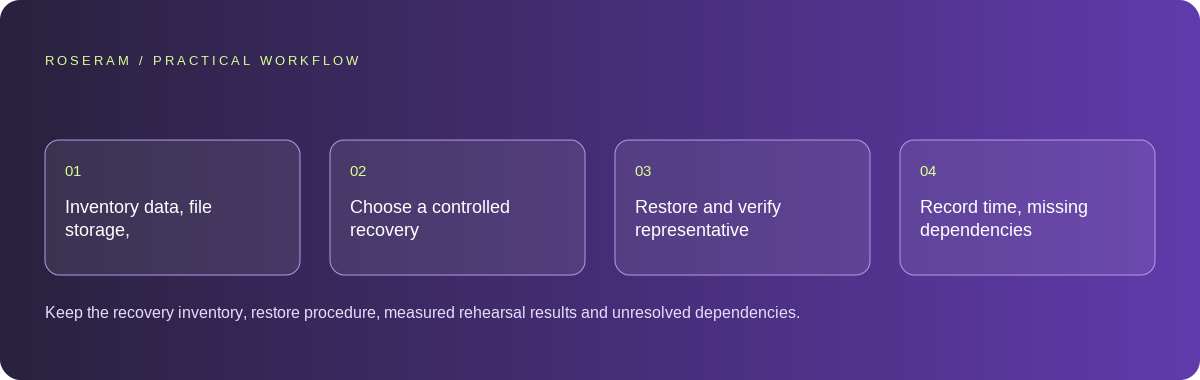
A worked example: where the task becomes difficult
A fictional membership app backs up its database but stores lesson files in a separate object store. Restoring only the tables produces broken downloads. The recovery plan needs data, files, required configuration names and the compatible application revision. Use synthetic records or an authorized protected recovery environment; do not expose real customer backups through a public preview.
Decisions to make before implementation
Set acceptable data loss and recovery time with the owner. Identify which systems must be consistent and how secrets are restored safely without placing them in ordinary backup documentation. Decide how restore operations avoid sending old notifications or restarting payment jobs. Keep backup encryption, access and retention aligned with the data sensitivity and operational requirements.
A practical sequence for the work
Use the sequence below as a task boundary, not as a claim that the example has been executed. Work with approved inputs and the project’s actual architecture. If a required integration or permission is unavailable, keep that stage visibly incomplete rather than generating a plausible substitute result.
- Inventory data, file storage, configuration and application revision dependencies.
- Choose a controlled recovery point and an isolated restore destination.
- Restore and verify representative read, write and private-file journeys.
- Record time, missing dependencies and corrective work before relying on the process.
A detailed brief you can adapt for your agent
Replace the illustrative context with your approved facts and controlled inputs. Keep the stated boundaries when adapting the brief. The expected deliverable matters more than a particular tool name: ask for an explanation grounded in the inspected material and evidence for the requested outcome.
Prepare a recovery rehearsal for this app using the supplied backup inventory. Include database, object files and compatible source revision. Restore only into the approved isolated destination and control external side effects. Verify representative journeys and record timing and gaps. Do not claim full recovery from a backup-file existence check.
Failure modes that an attractive preview can hide
A backup that exists but cannot be decrypted or restored with available access is not a usable recovery path. Avoid checking only file size. Restored queues can replay external side effects if adapters are active. Keep those effects disabled or safely controlled during rehearsal, and distinguish a database restore from a full service recovery.
Acceptance checks and the evidence to retain
Keep the recovery inventory, restore procedure, measured rehearsal results and unresolved dependencies. Review it after meaningful storage or architecture changes.
| Controlled case | Expected evidence |
|---|---|
| Database restores but files are absent | The rehearsal identifies missing storage dependencies. |
| Old queued notifications are present | The controlled environment does not send them to actual customers. |
| Recovered private record is opened | The restored access policy still protects it correctly. |
Common questions
Is a successful backup job enough?
No. Verify that the backup can restore the required application state.
Should restored jobs run immediately?
Control external side effects during rehearsal and reconcile jobs before production recovery.
What is the practical completion criterion?
Keep the recovery inventory, restore procedure, measured rehearsal results and unresolved dependencies. Review it after meaningful storage or architecture changes.
Where the facts come from
Use these links to check the technical facts. The stories here are made-up examples to help you learn. Roseram sells AI tools; our examples are not promises of results.
- MDN: practical security implementation guides ↗
What this source covers
Web security implementation reference; task-specific threat models and review remain necessary.
References last reviewed 2026-10-11. Writing refreshed 2026-10-14. Spot a mistake? Tell us.
