A front desk for your raw data
Elena runs a craft shop named Bright Box. Each week, makers send her big text files. A CSV is a comma-separated values file. It is a plain text file. It parts words with tiny commas. Elena needs an app to read these files.
Think of this app like a front mail desk. A clerk sits at the door all day. The clerk reads each box tag with care. No box enters the shop without a stamp. Our app checks each row before saving data.
This safe step keeps bad prices away. It guards the live catalog from harm. Elena sees all changes in a neat preview screen. She stays in charge of each product line. The shop stays neat and fast all day.
Elena wants to trust her shop records every day. Her team relies on these numbers to sell goods. The mail desk lets her catch flaws very fast. She fixes bad rows before her database changes.
- Read maker files without typing lines by hand.
- Check each row before you save to the database.
- Keep broken rows in view so you fix them fast.
Tools and inputs to gather first
You need three main assets before you write code. First, gather a sample file with good rows. Make sure it also holds a few bad rows. Second, write out your schema. A schema is a map of fields in a database. Third, pick an approved parser tool.
A parser is code that reads raw text. It turns raw lines into clean data sets. Do not chop lines on commas with basic code. Real item notes often wrap extra commas inside quotes. Basic tools split those lines into the wrong bins.
A good parser keeps quoted words in one spot. That keeps the shape of your row neat. The parser must read line breaks inside quotes too. You also need a view for early row counts. Early counts show what will change soon.
Check text format rules before you start the work. Files should use UTF-8 code. UTF-8 is a world rule for plain text letters. When files use standard formats, letters load well. That keeps maker item names from turning into scrambled marks.
Key choices to make before building
Make three big choices before writing your code. First, pick how you spot copies. A SKU means a stock keeping unit. It is an id code for one shop item. Each item in the catalog has one unique SKU.
Decide what happens when a new SKU matches an old item. Does the match update the old item right away? Or does the match show a loud conflict for review? State this rule clearly so the app knows what to do. The user must understand this rule beforehand.
Second, pick your batch rule for failed rows. An all-or-nothing rule stops the whole file on one flaw. A partial rule saves clean rows and skips bad lines. Show these choices to the user on the screen. Clear choices stop shock changes in your live store.
Third, track row tasks during big file jobs. Huge files take lots of time to run. A web page might time out while servers run. Give each task a unique job ID tag. A job ID lets a user check the job with no fear.
A worked example with inventory data
Elena tests her tool with four mock shop lines. Her maker is a team called North Ribbon Co. The test file has two clean lines. It also has two tricky lines to catch flaws. One line has a price with a dollar mark.
Another line holds a repeated SKU with new text. A third line holds a long note with breaks. Line breaks inside quotes can trip weak tools. Elena watches her app read each row with great care.
The AI tool links maker tags to store keys. Next, the server test flags line three right away. The price has a cash mark, not plain digits. Elena sees the flaw on her screen at once.
The duplicate SKU also gets a clear flag. The preview screen asks Elena how to proceed. She can reject the duplicate row with one click. She can also fix the bad price string. Her live store data stays safe from bad rows.
- Row 1: SKU-10, Silk Ribbon, 4.50, In stock.
- Row 2: SKU-11, Wool Yarn, 8.00, Soft green dye.
- Row 3: SKU-11, Wool Yarn, $8.00, Duplicate SKU key.
- Row 4: SKU-12, Craft Glue, 3.25, Fast drying\nClear type.
Concrete steps to build the workflow
First, let the client pick files on screen. Let your AI link unknown file heads to fields. For example, link Vendor Part Code to SKU. Show these matched pairs so the user can look.
Second, run strict server checks on each line. Ensure required cells exist on all clean lines. Ensure price cells hold pure digits with no marks. Web checks help users, but server checks guard data [source]. Both checks must use matched rules with no gaps.
Third, show a clear card before saving rows. Show total rows read and rows set to build. Show rows set to update and rows set aside. Tag the import run with a clear job ID. The user can see what will happen next.
Fourth, save the clean lines to your live base. Note which rows passed and which rows did not. Present a final report on the screen. The user can grab the bad rows to fix. That ends the run with plain proof throughout.
Read more: MDN: form validation
A second real case: conference guest lists
This same plan works well for event guest lists. Marcus hosts a big city design meet each fall. Three partner firms email him large lists of guests. One sheet writes full names in one long cell.
A second sheet puts first and last names apart. Marcus lets his AI tool suggest fast column links. His app uses the client email as an id. That unique key stops guests from being logged twice.
If a guest appears twice, the app halts. The tool flags the duplicate line for fast review. Marcus guards his room seat limit from double counts. His ticket tally stays true before guests reach the door.
The app checks for missing domain tags too. If a mail string lacks an at-sign, it fails. Marcus sees the row and the name right away. He asks the firm for the right mail text. His guest list stays neat and clear.
- Link split name fields to one client card.
- Use email keys to block repeat tickets.
- Check duplicate guest rows before seats fill.
Common mistakes and how to fix them
A bad mistake occurs when web links drop out. If a user clicks save twice, rows can repeat. Always attach a unique job ID to each batch. Check the saved job state before you run again. That check keeps your files neat and stops repeats.
Another big slip is turning blank cells to zero. A zero makes a costly item look totally free. Free items cause massive inventory errors in your shop. Treat empty cells as broken rows, not zero sums. Flag them for human review so prices stay correct.
Do not drop broken rows silently in the dark. If three rows fail, tell the user the lines. State which cell failed so they can fix flaws. Keep hints safe by not printing client secrets. Clear error views make fixes fast and quite simple.
- Never turn blank cells to zero without clear rules.
- Always show row counts for all rejected lines.
- Track job IDs so double clicks make no duplicates.
Tests you can perform right now
You can test your build with a small sheet. Create one row with commas wrapped in quotes. Run the test file through your parser right now. Check that the note stays inside one field. It must not split into two broken columns.
Next, test how the app takes dropped web calls. Send a batch and cut the test link midway. Make sure the app reads the job ID cleanly. The user should check the job before a retry. That test proves your app recovers from bad cuts.
Last, check your bug logs for correct row tags. Make sure the view states row counts for errors. Confirm that private client secrets stay hidden in logs. Keep these test notes handy as proof for future steps.
| Controlled case | Expected evidence |
|---|---|
| Description contains quoted commas and line breaks | It remains one correctly parsed field. |
| Duplicate SKU appears twice | The approved conflict rule is shown before commit. |
| Import response is interrupted | Operator can inspect the accepted job before retrying. |
Your practical next steps
Write out your target schema on a sheet today. Note down every field and its exact data type. Pick which column acts as your unique key value. Having clear rules makes writing code prompts very easy. Clear rules help your team avoid confusion later.
Next, write your AI prompt using your schema rules. Test the prompt against our sample rows to verify. Ensure error views state row numbers for broken lines. Keep your preview checks matching your final server checks. That keeps your whole team confident in the tool.
Roseram can help with a task, but access and limits depend on your current plan. Clear rules and smart previews keep your store records safe and clean forever.
You are an expert developer building an inventory importer. Use this destination schema: SKU (string, required, unique key), Name (string, required), Price (number, required), Description (string, optional). Write a module that parses raw CSV text while handling quoted line breaks. Map incoming headers to the schema and validate data types. Return a preview object that counts rows to create, rows to update, and invalid rows with specific row numbers. Assign an import job ID so retries do not create duplicate records.
Your idea. Your next step.
Put Roseram super intelligence to work.
Bring the idea you keep coming back to. Choose a Roseram plan, then give your project a clear first task. You can think it through, build a first version, and improve it as you learn.
Check current access, plan limits, and pricing before joining.
Your next step
Your quick checklist.
Tick a step as you finish it. Your ticks and feedback stay on this device. They are not public reviews.
0 of 6 complete
Tell the community what you tried or tell us what needs fixing. Include a source if you are correcting a fact.
Your questions, answered
Can I parse CSV by splitting commas?
Do not just split by commas. A CSV is a text list. Quotes and big lines break easily. Use a real parser tool instead.
Should valid rows import when others fail?
Pick a rule before you start. Show this choice on the screen. Let users see the full effect.
How do I know the task is done?
Keep your data rules and files. Let workers review rows before saving. Help them fix lines that fail.
Why must the preview match the final save rules?
Different rules create big surprises later. A user approves a good row. Then the row fails to save.
Want the technical details?Open the code notes, deeper checks, and common questions.
These notes go deeper. Use the parts that fit your project. Examples are for learning; they are not claims that we tested your app.
A worked example: where the task becomes difficult
A fictional inventory app imports products from a supplier spreadsheet. The file contains duplicate SKUs, prices with currency symbols and a description field containing line breaks. Splitting each line on commas will corrupt valid quoted fields. Use controlled examples with ordinary and unusual rows, then show the operator what will be created, updated or rejected before committing anything.
Decisions to make before implementation
Choose supported encoding, required headers, field types and duplicate identity. Decide whether an import is all-or-nothing or permits valid rows while rejecting others. Preserve row references in errors without publishing private contents. A preview must use the same validation contract as the commit. For large files, define job status and cancellation so a browser timeout does not make the operator assume nothing happened.
A practical sequence for the work
Use the sequence below as a task boundary, not as a claim that the example has been executed. Work with approved inputs and the project’s actual architecture. If a required integration or permission is unavailable, keep that stage visibly incomplete rather than generating a plausible substitute result.
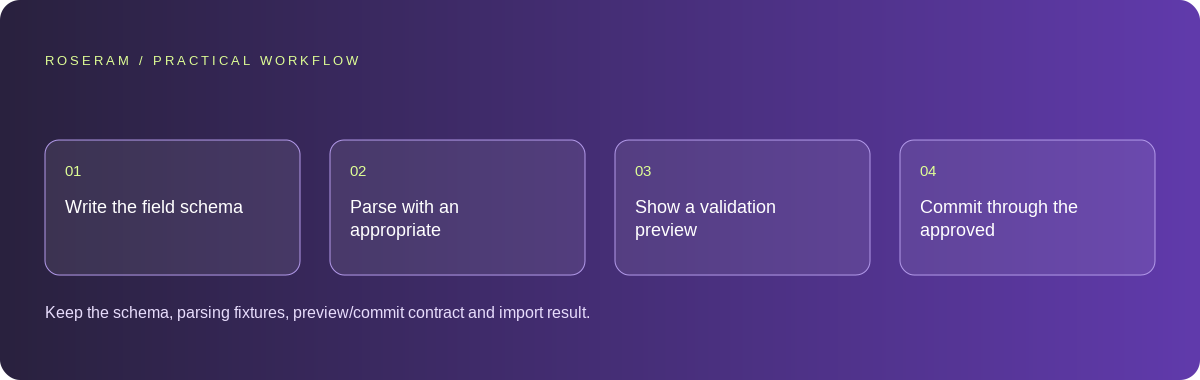
- Write the field schema and representative valid and invalid rows.
- Parse with an appropriate CSV implementation and map headers deliberately.
- Show a validation preview with create, update and rejected counts.
- Commit through the approved duplicate policy and provide a traceable result.
A detailed brief you can adapt for your agent
Replace the illustrative context with your approved facts and controlled inputs. Keep the stated boundaries when adapting the brief. The expected deliverable matters more than a particular tool name: ask for an explanation grounded in the inspected material and evidence for the requested outcome.
Build a supplier-product CSV importer using this schema and controlled fixtures. Support quoted fields, explicit header mapping and a validation preview. Define SKU conflicts and job identity. Keep preview and commit validation consistent. Do not silently overwrite records or treat blank prices as zero. Return row-level failures and a reliable final import state.
Failure modes that an attractive preview can hide
A retry after an uncertain response can duplicate rows if the import lacks job identity. Keep the accepted import reference and check its state before restarting. Do not silently convert missing prices to zero or overwrite existing products solely because names match. Large-file limits should be enforced at the receiving boundary, not only in the browser.
Read more: MDN: form validation
Acceptance checks and the evidence to retain
Keep the schema, parsing fixtures, preview/commit contract and import result. The operator should understand changes before accepting them and recover from an uncertain response.
| Controlled case | Expected evidence |
|---|---|
| Description contains quoted commas and line breaks | It remains one correctly parsed field. |
| Duplicate SKU appears twice | The approved conflict rule is shown before commit. |
| Import response is interrupted | Operator can inspect the accepted job before retrying. |
Common questions
Can I parse CSV by splitting commas?
Not reliably for quoted delimiters and multiline fields; use an appropriate parser.
Should valid rows import when others fail?
Choose that policy explicitly and show its consequences in the preview.
What is the practical completion criterion?
Keep the schema, parsing fixtures, preview/commit contract and import result. The operator should understand changes before accepting them and recover from an uncertain response.
Where the facts come from
Use these links to check the technical facts. The stories here are made-up examples to help you learn. Roseram sells AI tools; our examples are not promises of results.
- MDN: form validation ↗
What this source covers
Client validation helps users but cannot replace server-side validation.
References last reviewed 2026-10-11. Writing refreshed 2026-10-14. Spot a mistake? Tell us.
